알림 (Notifications)
소개 (Introduction)
Laravel은 이메일 전송을 지원하는 것에 더해, 이메일, SMS(이전에는 Nexmo로 알려졌던 Vonage를 통해), Slack을 포함한 다양한 전달 채널로 알림을 전송하는 기능을 제공합니다. 또한 여러 다른 채널을 통해 알림을 보낼 수 있도록 다양한 커뮤니티 제작 알림 채널도 만들어져 있습니다! 알림은 데이터베이스에 저장하여 웹 인터페이스에 표시할 수도 있습니다.
일반적으로 알림은 애플리케이션에서 발생한 일을 사용자에게 알려 주는 짧은 정보성 메시지여야 합니다. 예를 들어 결제 애플리케이션을 작성하고 있다면, 이메일과 SMS 채널을 통해 사용자에게 "Invoice Paid" 알림을 보낼 수 있습니다.
알림 생성 (Generating Notifications)
Laravel에서 각 알림은 보통 app/Notifications 디렉터리에 저장되는 하나의 클래스로 표현됩니다. 애플리케이션에 이 디렉터리가 보이지 않더라도 걱정하지 마십시오. make:notification Artisan 명령어를 실행하면 자동으로 생성됩니다.
php artisan make:notification InvoicePaid
이 명령어는 app/Notifications 디렉터리에 새 알림 클래스를 배치합니다. 각 알림 클래스에는 via 메서드와 toMail, toDatabase 같은 여러 메시지 생성 메서드가 포함되어 있으며, 이 메서드들은 알림을 해당 특정 채널에 맞는 메시지로 변환합니다.
알림 전송 (Sending Notifications)
Notifiable 트레이트 사용
알림은 두 가지 방법으로 전송할 수 있습니다. Notifiable 트레이트의 notify 메서드를 사용하거나, Notification 파사드를 사용할 수 있습니다. Notifiable 트레이트는 기본적으로 애플리케이션의 App\Models\User 모델에 포함되어 있습니다.
<?php

namespace App\Models;

use Illuminate\Foundation\Auth\User as Authenticatable;
use Illuminate\Notifications\Notifiable;

class User extends Authenticatable
{
    use Notifiable;
}
이 트레이트가 제공하는 notify 메서드는 알림 인스턴스를 전달받습니다.
use App\Notifications\InvoicePaid;

$user->notify(new InvoicePaid($invoice));
Notifiable트레이트는 모든 모델에서 사용할 수 있다는 점을 기억하십시오.User모델에만 포함해야 하는 것은 아닙니다.
Notification 파사드 사용
또는 Notification 파사드를 통해 알림을 전송할 수도 있습니다. 이 방식은 사용자 컬렉션처럼 알림을 받을 수 있는 여러 엔티티에 알림을 보내야 할 때 유용합니다. 파사드를 사용해 알림을 전송하려면, 알림을 받을 모든 엔티티와 알림 인스턴스를 send 메서드에 전달하십시오.
use Illuminate\Support\Facades\Notification;

Notification::send($users, new InvoicePaid($invoice));
sendNow 메서드를 사용하여 알림을 즉시 전송할 수도 있습니다. 이 메서드는 알림이 ShouldQueue 인터페이스를 구현하더라도 즉시 알림을 전송합니다.
Notification::sendNow($developers, new DeploymentCompleted($deployment));
전달 채널 지정
모든 알림 클래스에는 알림이 어떤 채널로 전달될지를 결정하는 via 메서드가 있습니다. 알림은 mail, database, broadcast, vonage, slack 채널로 전송할 수 있습니다.
Telegram이나 Pusher 같은 다른 전달 채널을 사용하고 싶다면, 커뮤니티가 운영하는 Laravel Notification Channels 웹사이트를 확인하십시오.
via 메서드는 알림이 전송될 클래스의 인스턴스인 $notifiable 인스턴스를 전달받습니다. $notifiable을 사용해 알림이 어떤 채널로 전달되어야 하는지 결정할 수 있습니다.
/**
 * Get the notification's delivery channels.
 *
 * @return array<int, string>
 */
public function via(object $notifiable): array
{
    return $notifiable->prefers_sms ? ['vonage'] : ['mail', 'database'];
}
알림 큐 처리
알림을 큐에 넣기 전에 큐를 설정하고 워커를 시작해야 합니다.
알림 전송에는 시간이 걸릴 수 있습니다. 특히 채널이 알림을 전달하기 위해 외부 API 호출을 해야 한다면 더 그렇습니다. 애플리케이션의 응답 시간을 빠르게 하려면 알림 클래스에 ShouldQueue 인터페이스와 Queueable 트레이트를 추가하여 알림이 큐에 들어가도록 하십시오. make:notification 명령어로 생성된 모든 알림에는 이 인터페이스와 트레이트가 이미 import되어 있으므로, 바로 알림 클래스에 추가할 수 있습니다.
<?php

namespace App\Notifications;

use Illuminate\Bus\Queueable;
use Illuminate\Contracts\Queue\ShouldQueue;
use Illuminate\Notifications\Notification;

class InvoicePaid extends Notification implements ShouldQueue
{
    use Queueable;

    // ...
}
알림에 ShouldQueue 인터페이스가 추가되면, 평소와 같은 방식으로 알림을 전송할 수 있습니다. Laravel은 클래스의 ShouldQueue 인터페이스를 감지하고 알림 전달을 자동으로 큐에 넣습니다.
$user->notify(new InvoicePaid($invoice));
알림을 큐에 넣으면 각 수신자와 채널 조합마다 하나의 큐 작업이 생성됩니다. 예를 들어 알림에 수신자가 세 명이고 채널이 두 개라면, 여섯 개의 작업이 큐에 디스패치됩니다.
알림 지연하기
알림 전달을 지연하고 싶다면 알림 인스턴스를 생성할 때 delay 메서드를 체이닝할 수 있습니다.
$delay = now()->plus(minutes: 10);

$user->notify((new InvoicePaid($invoice))->delay($delay));
특정 채널에 대한 지연 시간을 지정하려면 delay 메서드에 배열을 전달할 수 있습니다.
$user->notify((new InvoicePaid($invoice))->delay([
    'mail' => now()->plus(minutes: 5),
    'sms' => now()->plus(minutes: 10),
]));
또는 알림 클래스 자체에 withDelay 메서드를 정의할 수도 있습니다. withDelay 메서드는 채널 이름과 지연 값으로 이루어진 배열을 반환해야 합니다.
/**
 * Determine the notification's delivery delay.
 *
 * @return array<string, \Illuminate\Support\Carbon>
 */
public function withDelay(object $notifiable): array
{
    return [
        'mail' => now()->plus(minutes: 5),
        'sms' => now()->plus(minutes: 10),
    ];
}
알림 큐 연결 커스터마이징
기본적으로 큐에 들어간 알림은 애플리케이션의 기본 큐 연결을 사용해 큐에 등록됩니다. 특정 알림에 사용할 다른 연결을 지정하고 싶다면, 알림의 생성자에서 onConnection 메서드를 호출할 수 있습니다.
<?php

namespace App\Notifications;

use Illuminate\Bus\Queueable;
use Illuminate\Contracts\Queue\ShouldQueue;
use Illuminate\Notifications\Notification;

class InvoicePaid extends Notification implements ShouldQueue
{
    use Queueable;

    /**
     * Create a new notification instance.
     */
    public function __construct()
    {
        $this->onConnection('redis');
    }
}
또는 알림이 지원하는 각 알림 채널마다 사용할 특정 큐 연결을 지정하고 싶다면, 알림에 viaConnections 메서드를 정의할 수 있습니다. 이 메서드는 채널 이름 / 큐 연결 이름 쌍의 배열을 반환해야 합니다.
/**
 * Determine which connections should be used for each notification channel.
 *
 * @return array<string, string>
 */
public function viaConnections(): array
{
    return [
        'mail' => 'redis',
        'database' => 'sync',
    ];
}
알림 채널별 큐 커스터마이징
알림이 지원하는 각 알림 채널마다 사용할 특정 큐를 지정하고 싶다면, 알림에 viaQueues 메서드를 정의할 수 있습니다. 이 메서드는 채널 이름 / 큐 이름 쌍의 배열을 반환해야 합니다.
/**
 * Determine which queues should be used for each notification channel.
 *
 * @return array<string, string>
 */
public function viaQueues(): array
{
    return [
        'mail' => 'mail-queue',
        'slack' => 'slack-queue',
    ];
}
큐에 등록된 알림 작업 속성 커스터마이징
알림 클래스에 큐 속성을 정의하여 기반이 되는 큐 작업의 동작을 커스터마이징할 수 있습니다. 이 속성들은 알림을 전송하는 큐 작업에 상속됩니다.
<?php

namespace App\Notifications;

use Illuminate\Bus\Queueable;
use Illuminate\Contracts\Queue\ShouldQueue;
use Illuminate\Notifications\Notification;
use Illuminate\Queue\Attributes\MaxExceptions;
use Illuminate\Queue\Attributes\Timeout;
use Illuminate\Queue\Attributes\Tries;

#[Tries(5)]
#[Timeout(120)]
#[MaxExceptions(3)]
class InvoicePaid extends Notification implements ShouldQueue
{
    use Queueable;

    // ...
}
암호화를 통해 큐에 등록된 알림 데이터의 개인정보 보호와 무결성을 보장하고 싶다면, 알림 클래스에 ShouldBeEncrypted 인터페이스를 추가하십시오.
<?php

namespace App\Notifications;

use Illuminate\Bus\Queueable;
use Illuminate\Contracts\Queue\ShouldBeEncrypted;
use Illuminate\Contracts\Queue\ShouldQueue;
use Illuminate\Notifications\Notification;

class InvoicePaid extends Notification implements ShouldQueue, ShouldBeEncrypted
{
    use Queueable;

    // ...
}
이러한 속성을 알림 클래스에 직접 정의하는 것 외에도, backoff와 retryUntil 메서드를 정의하여 큐에 등록된 알림 작업의 백오프 전략과 재시도 제한 시간을 지정할 수 있습니다.
use DateTime;

/**
 * Calculate the number of seconds to wait before retrying the notification.
 */
public function backoff(): int
{
    return 3;
}

/**
 * Determine the time at which the notification should timeout.
 */
public function retryUntil(): DateTime
{
    return now()->plus(minutes: 5);
}
이러한 작업 속성과 메서드에 대한 자세한 내용은 큐 작업 문서를 확인하십시오.
큐에 등록된 알림 미들웨어
큐에 등록된 알림은 큐 작업과 마찬가지로 Middleware를 정의할 수 있습니다. 시작하려면 알림 클래스에 middleware 메서드를 정의하십시오. middleware 메서드는 $notifiable과 $channel 변수를 전달받으며, 이를 통해 알림의 목적지에 따라 반환할 Middleware를 커스터마이징할 수 있습니다.
use Illuminate\Queue\Middleware\RateLimited;

/**
 * Get the middleware the notification job should pass through.
 *
 * @return array<int, object>
 */
public function middleware(object $notifiable, string $channel)
{
    return match ($channel) {
        'mail' => [new RateLimited('postmark')],
        'slack' => [new RateLimited('slack')],
        default => [],
    };
}
큐에 등록된 알림과 데이터베이스 트랜잭션
큐에 등록된 알림이 데이터베이스 트랜잭션 안에서 디스패치되면, 데이터베이스 트랜잭션이 커밋되기 전에 큐가 이를 처리할 수 있습니다. 이런 일이 발생하면 데이터베이스 트랜잭션 중에 모델이나 데이터베이스 레코드에 적용한 업데이트가 아직 데이터베이스에 반영되지 않았을 수 있습니다. 또한 트랜잭션 안에서 생성된 모델이나 데이터베이스 레코드가 데이터베이스에 존재하지 않을 수도 있습니다. 알림이 이러한 모델에 의존한다면, 큐에 등록된 알림을 전송하는 작업이 처리될 때 예상치 못한 오류가 발생할 수 있습니다.
큐 연결의 after_commit 설정 옵션이 false로 설정되어 있더라도, 알림을 전송할 때 afterCommit 메서드를 호출하여 특정 큐 알림이 열려 있는 모든 데이터베이스 트랜잭션이 커밋된 이후에 디스패치되어야 한다고 지정할 수 있습니다.
use App\Notifications\InvoicePaid;

$user->notify((new InvoicePaid($invoice))->afterCommit());
또는 알림의 생성자에서 afterCommit 메서드를 호출할 수도 있습니다.
<?php

namespace App\Notifications;

use Illuminate\Bus\Queueable;
use Illuminate\Contracts\Queue\ShouldQueue;
use Illuminate\Notifications\Notification;

class InvoicePaid extends Notification implements ShouldQueue
{
    use Queueable;

    /**
     * Create a new notification instance.
     */
    public function __construct()
    {
        $this->afterCommit();
    }
}
이러한 문제를 우회하는 방법을 더 알아보려면 큐 작업과 데이터베이스 트랜잭션에 관한 문서를 확인하십시오.
큐에 추가된 알림을 전송해야 하는지 결정하기
큐에 추가된 알림이 백그라운드 처리를 위해 큐에 디스패치되면, 일반적으로 큐 워커가 이를 받아 의도한 수신자에게 전송합니다.
하지만 큐 워커가 알림을 처리하는 시점에, 큐에 추가된 알림을 실제로 전송할지 최종적으로 결정하고 싶다면 알림 클래스에 shouldSend 메서드를 정의할 수 있습니다. 이 메서드가 false를 반환하면 알림은 전송되지 않습니다.
/**
 * Determine if the notification should be sent.
 */
public function shouldSend(object $notifiable, string $channel): bool
{
    return $this->invoice->isPaid();
}
알림 전송 후 처리
알림이 전송된 후 코드를 실행하고 싶다면 알림 클래스에 afterSending 메서드를 정의할 수 있습니다. 이 메서드는 알림을 받을 수 있는 엔티티, 채널 이름, 그리고 채널의 응답을 전달받습니다.
/**
 * Handle the notification after it has been sent.
 */
public function afterSending(object $notifiable, string $channel, mixed $response): void
{
    // ...
}
온디맨드 알림
때로는 애플리케이션의 "사용자"로 저장되어 있지 않은 사람에게 알림을 보내야 할 수 있습니다. Notification 파사드의 route 메서드를 사용하면 알림을 보내기 전에 임시 알림 라우팅 정보를 지정할 수 있습니다.
use Illuminate\Broadcasting\Channel;
use Illuminate\Support\Facades\Notification;
->route('vonage', '5555555555')
->route('slack', '#slack-channel')
->route('broadcast', [new Channel('channel-name')])
->notify(new InvoicePaid($invoice));
mail 라우트로 온디맨드 알림을 보낼 때 수신자의 이름을 함께 제공하고 싶다면, 배열의 첫 번째 요소에서 이메일 주소를 키로, 이름을 값으로 포함하는 배열을 전달할 수 있습니다.
Notification::route('mail', [
])->notify(new InvoicePaid($invoice));
routes 메서드를 사용하면 여러 알림 채널에 대한 임시 라우팅 정보를 한 번에 제공할 수 있습니다.
Notification::routes([
'vonage' => '5555555555',
])->notify(new InvoicePaid($invoice));
메일 알림 (Mail Notifications)
메일 메시지 형식 지정
알림이 이메일로 전송될 수 있다면 알림 클래스에 toMail 메서드를 정의해야 합니다. 이 메서드는 $notifiable 엔티티를 전달받고 Illuminate\Notifications\Messages\MailMessage 인스턴스를 반환해야 합니다.
MailMessage 클래스에는 트랜잭션 이메일 메시지를 작성하는 데 도움이 되는 몇 가지 간단한 메서드가 포함되어 있습니다. 메일 메시지에는 텍스트 줄과 "행동 유도"가 포함될 수 있습니다. 다음은 toMail 메서드 예시입니다.
/**
 * Get the mail representation of the notification.
 */
public function toMail(object $notifiable): MailMessage
{
    $url = url('/invoice/'.$this->invoice->id);

    return (new MailMessage)
        ->greeting('Hello!')
        ->line('One of your invoices has been paid!')
        ->lineIf($this->amount > 0, "Amount paid: {$this->amount}")
        ->action('View Invoice', $url)
        ->line('Thank you for using our application!');
}
toMail메서드에서$this->invoice->id를 사용하고 있다는 점에 주목하십시오. 알림 메시지를 생성하는 데 필요한 모든 데이터를 알림의 생성자에 전달할 수 있습니다.
이 예시에서는 인사말, 텍스트 줄, 행동 유도, 그리고 또 다른 텍스트 줄을 등록합니다. MailMessage 객체가 제공하는 이러한 메서드를 사용하면 작은 트랜잭션 이메일을 쉽고 빠르게 구성할 수 있습니다. 그런 다음 메일 채널은 메시지 구성 요소를 보기 좋은 반응형 HTML 이메일 템플릿과 그에 대응하는 일반 텍스트 버전으로 변환합니다. 다음은 mail 채널이 생성한 이메일 예시입니다.
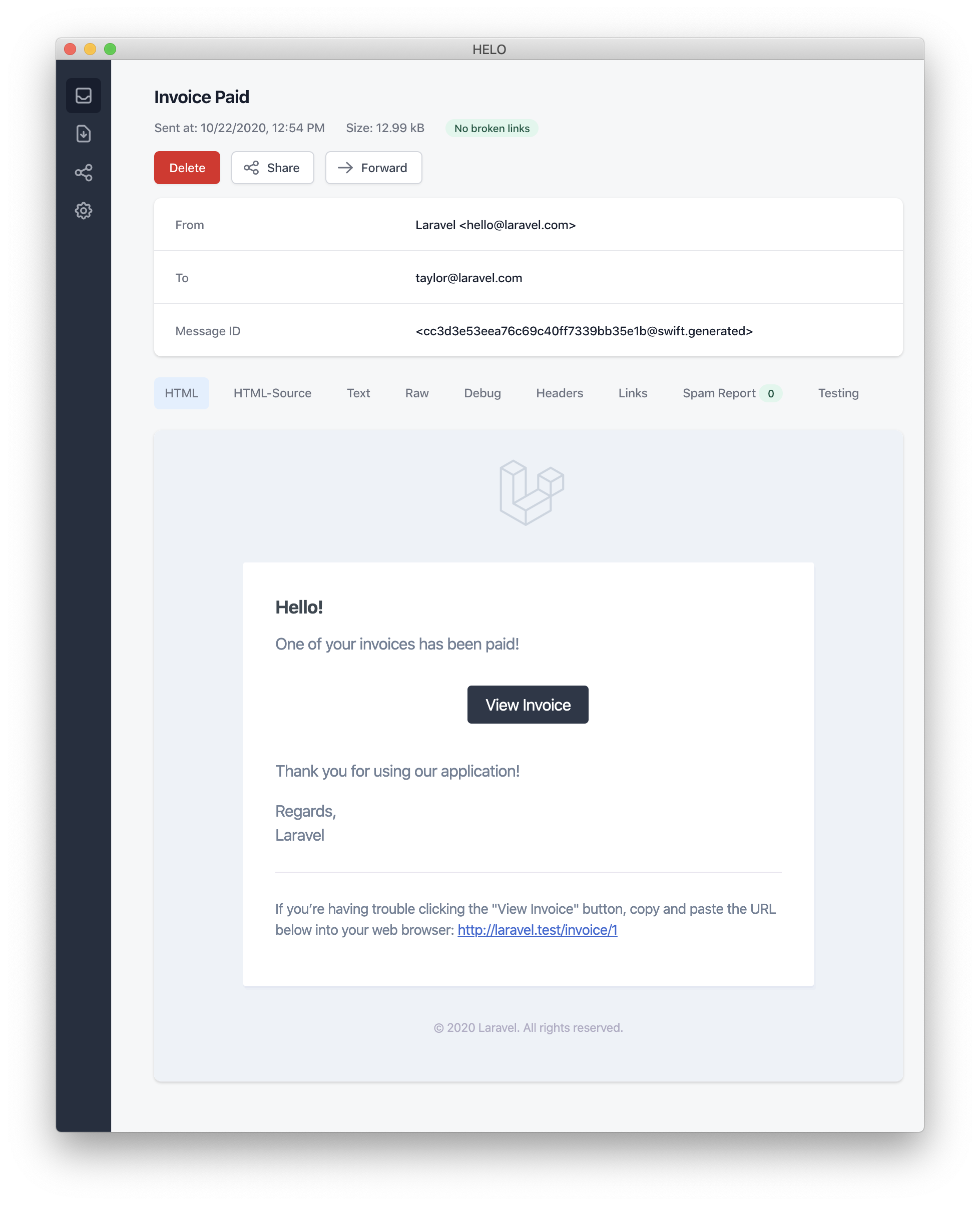
메일 알림을 보낼 때는
config/app.php설정 파일의name설정 옵션을 반드시 지정하십시오. 이 값은 메일 알림 메시지의 헤더와 푸터에서 사용됩니다.
오류 메시지
일부 알림은 송장 결제 실패와 같은 오류를 사용자에게 알려줍니다. 메시지를 작성할 때 error 메서드를 호출하면 해당 메일 메시지가 오류와 관련된 것임을 나타낼 수 있습니다. 메일 메시지에서 error 메서드를 사용하면 행동 유도 버튼이 검은색 대신 빨간색으로 표시됩니다.
/**
 * Get the mail representation of the notification.
 */
public function toMail(object $notifiable): MailMessage
{
    return (new MailMessage)
        ->error()
        ->subject('Invoice Payment Failed')
        ->line('...');
}
기타 메일 알림 형식 지정 옵션
알림 클래스에서 텍스트 "줄"을 정의하는 대신, view 메서드를 사용하여 알림 이메일을 렌더링할 때 사용할 커스텀 템플릿을 지정할 수 있습니다.
/**
 * Get the mail representation of the notification.
 */
public function toMail(object $notifiable): MailMessage
{
    return (new MailMessage)->view(
        'mail.invoice.paid', ['invoice' => $this->invoice]
    );
}
메일 메시지의 일반 텍스트 뷰는 view 메서드에 전달하는 배열의 두 번째 요소로 뷰 이름을 전달하여 지정할 수 있습니다.
/**
 * Get the mail representation of the notification.
 */
public function toMail(object $notifiable): MailMessage
{
    return (new MailMessage)->view(
        ['mail.invoice.paid', 'mail.invoice.paid-text'],
        ['invoice' => $this->invoice]
    );
}
또는 메시지에 일반 텍스트 뷰만 있는 경우 text 메서드를 사용할 수 있습니다.
/**
 * Get the mail representation of the notification.
 */
public function toMail(object $notifiable): MailMessage
{
    return (new MailMessage)->text(
        'mail.invoice.paid-text', ['invoice' => $this->invoice]
    );
}
발신자 커스터마이징
기본적으로 이메일의 발신자 / from 주소는 config/mail.php 설정 파일에 정의됩니다. 하지만 from 메서드를 사용하여 특정 알림에 대한 발신자 주소를 지정할 수 있습니다.
/**
* Get the mail representation of the notification.
*/
public function toMail(object $notifiable): MailMessage
{
return (new MailMessage)
->line('...');
}
수신자 커스터마이징
mail 채널을 통해 알림을 보낼 때 알림 시스템은 알림을 받을 수 있는 엔티티에서 email 속성을 자동으로 찾습니다. 알림을 전달하는 데 사용할 이메일 주소를 커스터마이징하려면, 알림을 받을 수 있는 엔티티에 routeNotificationForMail 메서드를 정의하면 됩니다.
<?php

namespace App\Models;

use Illuminate\Foundation\Auth\User as Authenticatable;
use Illuminate\Notifications\Notifiable;
use Illuminate\Notifications\Notification;

class User extends Authenticatable
{
    use Notifiable;

    /**
     * Route notifications for the mail channel.
     *
     * @return  array<string, string>|string
     */
    public function routeNotificationForMail(Notification $notification): array|string
    {
        // Return email address only...
        return $this->email_address;

        // Return email address and name...
        return [$this->email_address => $this->name];
    }
}
제목 커스터마이징
기본적으로 이메일 제목은 알림 클래스 이름을 "Title Case" 형식으로 변환한 값입니다. 따라서 알림 클래스 이름이 InvoicePaid라면 이메일 제목은 Invoice Paid가 됩니다. 메시지에 다른 제목을 지정하고 싶다면 메시지를 작성할 때 subject 메서드를 호출하면 됩니다.
/**
 * Get the mail representation of the notification.
 */
public function toMail(object $notifiable): MailMessage
{
    return (new MailMessage)
        ->subject('Notification Subject')
        ->line('...');
}
Mailer 커스터마이징
기본적으로 이메일 알림은 config/mail.php 설정 파일에 정의된 기본 mailer를 사용하여 전송됩니다. 하지만 메시지를 작성할 때 mailer 메서드를 호출하면 런타임에 다른 mailer를 지정할 수 있습니다.
/**
 * Get the mail representation of the notification.
 */
public function toMail(object $notifiable): MailMessage
{
    return (new MailMessage)
        ->mailer('postmark')
        ->line('...');
}
템플릿 커스터마이징
알림 패키지의 리소스를 퍼블리시하면 메일 알림에서 사용하는 HTML 및 일반 텍스트 템플릿을 수정할 수 있습니다. 이 명령어를 실행한 후에는 메일 알림 템플릿이 resources/views/vendor/notifications 디렉터리에 위치합니다.
php artisan vendor:publish --tag=laravel-notifications
첨부 파일
이메일 알림에 첨부 파일을 추가하려면 메시지를 작성할 때 attach 메서드를 사용하십시오. attach 메서드는 첫 번째 인수로 파일의 절대 경로를 받습니다.
/**
 * Get the mail representation of the notification.
 */
public function toMail(object $notifiable): MailMessage
{
    return (new MailMessage)
        ->greeting('Hello!')
        ->attach('/path/to/file');
}
알림 메일 메시지가 제공하는
attach메서드는 첨부 가능한 객체도 받을 수 있습니다. 더 자세히 알아보려면 종합적인 첨부 가능한 객체 문서를 참고하십시오.
메시지에 파일을 첨부할 때는 attach 메서드의 두 번째 인수로 array를 전달하여 표시 이름 및 / 또는 MIME 타입을 지정할 수도 있습니다.
/**
 * Get the mail representation of the notification.
 */
public function toMail(object $notifiable): MailMessage
{
    return (new MailMessage)
        ->greeting('Hello!')
        ->attach('/path/to/file', [
            'as' => 'name.pdf',
            'mime' => 'application/pdf',
        ]);
}
mailable 객체에서 파일을 첨부하는 것과 달리, attachFromStorage를 사용하여 스토리지 디스크에서 직접 파일을 첨부할 수는 없습니다. 대신 스토리지 디스크에 있는 파일의 절대 경로와 함께 attach 메서드를 사용해야 합니다. 또는 toMail 메서드에서 mailable을 반환할 수도 있습니다.
use App\Mail\InvoicePaid as InvoicePaidMailable;

/**
 * Get the mail representation of the notification.
 */
public function toMail(object $notifiable): Mailable
{
    return (new InvoicePaidMailable($this->invoice))
        ->to($notifiable->email)
        ->attachFromStorage('/path/to/file');
}
필요한 경우 attachMany 메서드를 사용하여 여러 파일을 메시지에 첨부할 수 있습니다.
/**
 * Get the mail representation of the notification.
 */
public function toMail(object $notifiable): MailMessage
{
    return (new MailMessage)
        ->greeting('Hello!')
        ->attachMany([
            '/path/to/forge.svg',
            '/path/to/vapor.svg' => [
                'as' => 'Logo.svg',
                'mime' => 'image/svg+xml',
            ],
        ]);
}
원시 데이터 첨부 파일
attachData 메서드는 원시 바이트 문자열을 첨부 파일로 첨부하는 데 사용할 수 있습니다. attachData 메서드를 호출할 때는 첨부 파일에 지정할 파일 이름을 제공해야 합니다.
/**
 * Get the mail representation of the notification.
 */
public function toMail(object $notifiable): MailMessage
{
    return (new MailMessage)
        ->greeting('Hello!')
        ->attachData($this->pdf, 'name.pdf', [
            'mime' => 'application/pdf',
        ]);
}
태그와 메타데이터 추가
Mailgun, Postmark와 같은 일부 서드파티 이메일 제공업체는 애플리케이션이 보낸 이메일을 그룹화하고 추적하는 데 사용할 수 있는 메시지 "태그"와 "메타데이터"를 지원합니다. tag 및 metadata 메서드를 통해 이메일 메시지에 태그와 메타데이터를 추가할 수 있습니다.
/**
 * Get the mail representation of the notification.
 */
public function toMail(object $notifiable): MailMessage
{
    return (new MailMessage)
        ->greeting('Comment Upvoted!')
        ->tag('upvote')
        ->metadata('comment_id', $this->comment->id);
}
애플리케이션이 Mailgun 드라이버를 사용한다면 태그와 메타데이터에 대한 자세한 내용은 Mailgun 문서를 참고할 수 있습니다. 마찬가지로 Postmark가 지원하는 태그와 메타데이터에 대한 자세한 내용은 Postmark 문서를 참고할 수 있습니다.
애플리케이션이 Amazon SES를 사용하여 이메일을 보내는 경우, metadata 메서드를 사용하여 SES "태그"를 메시지에 첨부해야 합니다.
Symfony 메시지 커스터마이징
MailMessage 클래스의 withSymfonyMessage 메서드를 사용하면 메시지를 보내기 전에 Symfony Message 인스턴스와 함께 호출될 클로저를 등록할 수 있습니다. 이를 통해 메시지가 전달되기 전에 메시지를 더 깊이 커스터마이징할 수 있습니다.
use Symfony\Component\Mime\Email;

/**
 * Get the mail representation of the notification.
 */
public function toMail(object $notifiable): MailMessage
{
    return (new MailMessage)
        ->withSymfonyMessage(function (Email $message) {
            $message->getHeaders()->addTextHeader(
                'Custom-Header', 'Header Value'
            );
        });
}
Mailables 사용하기
필요하다면 알림의 toMail 메서드에서 전체 mailable 객체를 반환할 수 있습니다. MailMessage 대신 Mailable을 반환할 때는 mailable 객체의 to 메서드를 사용하여 메시지 수신자를 지정해야 합니다.
use App\Mail\InvoicePaid as InvoicePaidMailable;
use Illuminate\Mail\Mailable;

/**
 * Get the mail representation of the notification.
 */
public function toMail(object $notifiable): Mailable
{
    return (new InvoicePaidMailable($this->invoice))
        ->to($notifiable->email);
}
Mailable과 온디맨드 알림
온디맨드 알림을 보내는 경우, toMail 메서드에 전달되는 $notifiable 인스턴스는 Illuminate\Notifications\AnonymousNotifiable의 인스턴스입니다. 이 클래스는 온디맨드 알림을 보낼 이메일 주소를 가져오는 데 사용할 수 있는 routeNotificationFor 메서드를 제공합니다.
use App\Mail\InvoicePaid as InvoicePaidMailable;
use Illuminate\Notifications\AnonymousNotifiable;
use Illuminate\Mail\Mailable;

/**
 * Get the mail representation of the notification.
 */
public function toMail(object $notifiable): Mailable
{
    $address = $notifiable instanceof AnonymousNotifiable
        ? $notifiable->routeNotificationFor('mail')
        : $notifiable->email;

    return (new InvoicePaidMailable($this->invoice))
        ->to($address);
}
메일 알림 미리보기
메일 알림 템플릿을 디자인할 때는 일반적인 Blade 템플릿처럼 렌더링된 메일 메시지를 브라우저에서 빠르게 미리 볼 수 있으면 편리합니다. 이를 위해 Laravel은 메일 알림이 생성한 어떤 메일 메시지든 라우트 클로저나 컨트롤러에서 직접 반환할 수 있도록 지원합니다. MailMessage가 반환되면 브라우저에서 렌더링되어 표시되므로, 실제 이메일 주소로 전송하지 않고도 디자인을 빠르게 미리 볼 수 있습니다.
use App\Models\Invoice;
use App\Notifications\InvoicePaid;

Route::get('/notification', function () {
    $invoice = Invoice::find(1);

    return (new InvoicePaid($invoice))
        ->toMail($invoice->user);
});
Markdown 메일 알림 (Markdown Mail Notifications)
Markdown 메일 알림을 사용하면 미리 만들어진 메일 알림 템플릿을 활용하면서도, 더 길고 사용자 정의된 메시지를 자유롭게 작성할 수 있습니다. 메시지는 Markdown으로 작성되므로 Laravel은 보기 좋고 반응형인 HTML 템플릿을 렌더링할 수 있으며, 동시에 일반 텍스트 버전도 자동으로 생성합니다.
메시지 생성
해당 Markdown 템플릿을 사용하는 알림을 생성하려면 make:notification Artisan 명령어의 --markdown 옵션을 사용할 수 있습니다.
php artisan make:notification InvoicePaid --markdown=mail.invoice.paid
다른 모든 메일 알림과 마찬가지로, Markdown 템플릿을 사용하는 알림도 알림 클래스에 toMail 메서드를 정의해야 합니다. 다만 알림을 구성할 때 line과 action 메서드를 사용하는 대신, 사용할 Markdown 템플릿의 이름을 지정하기 위해 markdown 메서드를 사용합니다. 템플릿에서 사용할 수 있게 만들 데이터 배열은 이 메서드의 두 번째 인수로 전달할 수 있습니다.
/**
 * Get the mail representation of the notification.
 */
public function toMail(object $notifiable): MailMessage
{
    $url = url('/invoice/'.$this->invoice->id);

    return (new MailMessage)
        ->subject('Invoice Paid')
        ->markdown('mail.invoice.paid', ['url' => $url]);
}
메시지 작성
Markdown 메일 알림은 Blade 컴포넌트와 Markdown 문법을 함께 사용합니다. 이를 통해 Laravel이 미리 제공하는 알림 컴포넌트를 활용하면서 알림을 쉽게 구성할 수 있습니다.
<x-mail::message>
# Invoice Paid

Your invoice has been paid!

<x-mail::button :url="$url">
View Invoice
</x-mail::button>

Thanks,<br>
{{ config('app.name') }}
</x-mail::message>
Markdown 이메일을 작성할 때 과도한 들여쓰기를 사용하지 마십시오. Markdown 표준에 따라 Markdown 파서는 들여쓰기된 내용을 코드 블록으로 렌더링합니다.
버튼 컴포넌트
버튼 컴포넌트는 가운데 정렬된 버튼 링크를 렌더링합니다. 이 컴포넌트는 url과 선택 사항인 color 두 가지 인수를 받습니다. 지원되는 색상은 primary, green, red입니다. 알림에는 원하는 만큼 버튼 컴포넌트를 추가할 수 있습니다.
<x-mail::button :url="$url" color="green">
View Invoice
</x-mail::button>
패널 컴포넌트
패널 컴포넌트는 주어진 텍스트 블록을 알림의 나머지 부분과 약간 다른 배경색을 가진 패널 안에 렌더링합니다. 이를 통해 특정 텍스트 블록에 독자의 주의를 끌 수 있습니다.
<x-mail::panel>
This is the panel content.
</x-mail::panel>
테이블 컴포넌트
테이블 컴포넌트를 사용하면 Markdown 테이블을 HTML 테이블로 변환할 수 있습니다. 이 컴포넌트는 Markdown 테이블을 콘텐츠로 받습니다. 테이블 컬럼 정렬은 기본 Markdown 테이블 정렬 문법을 사용하여 지원됩니다.
<x-mail::table>
| Laravel       | Table         | Example       |
| ------------- | :-----------: | ------------: |
| Col 2 is      | Centered      | $10           |
| Col 3 is      | Right-Aligned | $20           |
</x-mail::table>
컴포넌트 사용자 정의
모든 Markdown 알림 컴포넌트를 애플리케이션으로 내보내 사용자 정의할 수 있습니다. 컴포넌트를 내보내려면 vendor:publish Artisan 명령어를 사용하여 laravel-mail 에셋 태그를 게시합니다.
php artisan vendor:publish --tag=laravel-mail
이 명령어는 Markdown 메일 컴포넌트를 resources/views/vendor/mail 디렉터리에 게시합니다. mail 디렉터리에는 html 디렉터리와 text 디렉터리가 포함되며, 각 디렉터리에는 사용 가능한 모든 컴포넌트의 해당 표현이 들어 있습니다. 이 컴포넌트들은 원하는 방식으로 자유롭게 사용자 정의할 수 있습니다.
CSS 사용자 정의
컴포넌트를 내보낸 후에는 resources/views/vendor/mail/html/themes 디렉터리에 default.css 파일이 포함됩니다. 이 파일의 CSS를 사용자 정의할 수 있으며, 작성한 스타일은 Markdown 알림의 HTML 표현 안에 자동으로 인라인 처리됩니다.
Laravel의 Markdown 컴포넌트를 위한 완전히 새로운 테마를 만들고 싶다면 html/themes 디렉터리 안에 CSS 파일을 배치하면 됩니다. CSS 파일의 이름을 정하고 저장한 뒤, mail 설정 파일의 theme 옵션을 새 테마 이름과 일치하도록 업데이트합니다.
개별 알림의 테마를 사용자 정의하려면 알림의 메일 메시지를 구성하는 동안 theme 메서드를 호출할 수 있습니다. theme 메서드는 알림을 보낼 때 사용할 테마의 이름을 받습니다.
/**
 * Get the mail representation of the notification.
 */
public function toMail(object $notifiable): MailMessage
{
    return (new MailMessage)
        ->theme('invoice')
        ->subject('Invoice Paid')
        ->markdown('mail.invoice.paid', ['url' => $url]);
}
데이터베이스 알림 (Database Notifications)
사전 준비
database 알림 채널은 알림 정보를 데이터베이스 테이블에 저장합니다. 이 테이블에는 알림 유형과 알림을 설명하는 JSON 데이터 구조 같은 정보가 포함됩니다.
이 테이블을 조회하여 애플리케이션의 사용자 인터페이스에 알림을 표시할 수 있습니다. 하지만 그렇게 하기 전에 알림을 저장할 데이터베이스 테이블을 만들어야 합니다. 적절한 테이블 스키마를 가진 마이그레이션을 생성하려면 make:notifications-table 명령어를 사용할 수 있습니다.
php artisan make:notifications-table

php artisan migrate
알림을 받을 수 있는 모델이 UUID 또는 ULID 기본 키를 사용한다면, 알림 테이블 마이그레이션에서
morphs메서드를 uuidMorphs 또는 ulidMorphs로 바꿔야 합니다.
데이터베이스 알림 형식 지정
알림이 데이터베이스 테이블에 저장되는 기능을 지원한다면, 알림 클래스에 toDatabase 또는 toArray 메서드를 정의해야 합니다. 이 메서드는 $notifiable 엔티티를 전달받고 일반 PHP 배열을 반환해야 합니다. 반환된 배열은 JSON으로 인코딩되어 notifications 테이블의 data 컬럼에 저장됩니다. 다음은 toArray 메서드 예시입니다.
/**
 * Get the array representation of the notification.
 *
 * @return array<string, mixed>
 */
public function toArray(object $notifiable): array
{
    return [
        'invoice_id' => $this->invoice->id,
        'amount' => $this->invoice->amount,
    ];
}
알림이 애플리케이션의 데이터베이스에 저장되면, 기본적으로 type 컬럼은 알림의 클래스 이름으로 설정되고 read_at 컬럼은 null이 됩니다. 하지만 알림 클래스에 databaseType 및 initialDatabaseReadAtValue 메서드를 정의하여 이 동작을 사용자 정의할 수 있습니다.
use Illuminate\Support\Carbon;

/**
 * Get the notification's database type.
 */
public function databaseType(object $notifiable): string
{
    return 'invoice-paid';
}

/**
 * Get the initial value for the "read_at" column.
 */
public function initialDatabaseReadAtValue(): ?Carbon
{
    return null;
}
toDatabase와 toArray 비교
toArray 메서드는 broadcast 채널에서도 JavaScript 기반 프런트엔드로 브로드캐스트할 데이터를 결정하는 데 사용됩니다. database 채널과 broadcast 채널에 서로 다른 배열 표현을 사용하고 싶다면, toArray 메서드 대신 toDatabase 메서드를 정의해야 합니다.
알림에 접근하기
알림이 데이터베이스에 저장되면, 알림을 받을 수 있는 엔티티에서 해당 알림에 편리하게 접근할 방법이 필요합니다. Laravel의 기본 App\Models\User 모델에 포함되어 있는 Illuminate\Notifications\Notifiable 트레이트는 해당 엔티티의 알림을 반환하는 notifications Eloquent 연관관계를 포함합니다. 알림을 가져오려면 다른 Eloquent 연관관계와 마찬가지로 이 메서드에 접근하면 됩니다. 기본적으로 알림은 created_at 타임스탬프를 기준으로 정렬되며, 가장 최근 알림이 컬렉션의 앞쪽에 배치됩니다.
$user = App\Models\User::find(1);

foreach ($user->notifications as $notification) {
    echo $notification->type;
}
"읽지 않은" 알림만 가져오고 싶다면 unreadNotifications 연관관계를 사용할 수 있습니다. 이 경우에도 알림은 created_at 타임스탬프를 기준으로 정렬되며, 가장 최근 알림이 컬렉션의 앞쪽에 배치됩니다.
$user = App\Models\User::find(1);

foreach ($user->unreadNotifications as $notification) {
    echo $notification->type;
}
"읽은" 알림만 가져오고 싶다면 readNotifications 연관관계를 사용할 수 있습니다.
$user = App\Models\User::find(1);

foreach ($user->readNotifications as $notification) {
    echo $notification->type;
}
JavaScript 클라이언트에서 알림에 접근하려면, 현재 사용자와 같은 알림 수신 가능 엔티티의 알림을 반환하는 알림 컨트롤러를 애플리케이션에 정의해야 합니다. 그런 다음 JavaScript 클라이언트에서 해당 컨트롤러의 URL로 HTTP 요청을 보낼 수 있습니다.
알림을 읽음으로 표시하기
일반적으로 사용자가 알림을 확인하면 해당 알림을 "읽음"으로 표시하고 싶을 것입니다. Illuminate\Notifications\Notifiable 트레이트는 알림의 데이터베이스 레코드에서 read_at 컬럼을 업데이트하는 markAsRead 메서드를 제공합니다.
$user = App\Models\User::find(1);

foreach ($user->unreadNotifications as $notification) {
    $notification->markAsRead();
}
하지만 각 알림을 반복 처리하는 대신, 알림 컬렉션에 직접 markAsRead 메서드를 사용할 수도 있습니다.
$user->unreadNotifications->markAsRead();
데이터베이스에서 알림을 가져오지 않고 모든 알림을 읽음으로 표시하려면 대량 업데이트 쿼리를 사용할 수도 있습니다.
$user = App\Models\User::find(1);

$user->unreadNotifications()->update(['read_at' => now()]);
알림을 테이블에서 완전히 제거하려면 delete를 사용할 수 있습니다.
$user->notifications()->delete();
브로드캐스트 알림 (Broadcast Notifications)
사전 준비
알림을 브로드캐스트하기 전에 Laravel의 이벤트 브로드캐스팅 서비스를 설정하고 익숙해져야 합니다. 이벤트 브로드캐스팅은 JavaScript 기반 프런트엔드에서 서버 측 Laravel 이벤트에 반응할 수 있는 방법을 제공합니다.
브로드캐스트 알림 형식 지정
broadcast 채널은 Laravel의 이벤트 브로드캐스팅 서비스를 사용하여 알림을 브로드캐스트합니다. 이를 통해 JavaScript 기반 프런트엔드가 알림을 실시간으로 받을 수 있습니다. 알림이 브로드캐스트를 지원한다면, 알림 클래스에 toBroadcast 메서드를 정의할 수 있습니다. 이 메서드는 $notifiable 엔티티를 전달받고 BroadcastMessage 인스턴스를 반환해야 합니다. toBroadcast 메서드가 없으면, 브로드캐스트할 데이터를 수집하기 위해 toArray 메서드가 사용됩니다. 반환된 데이터는 JSON으로 인코딩되어 JavaScript 기반 프런트엔드로 브로드캐스트됩니다. 다음은 toBroadcast 메서드 예시입니다.
use Illuminate\Notifications\Messages\BroadcastMessage;

/**
 * Get the broadcastable representation of the notification.
 */
public function toBroadcast(object $notifiable): BroadcastMessage
{
    return new BroadcastMessage([
        'invoice_id' => $this->invoice->id,
        'amount' => $this->invoice->amount,
    ]);
}
브로드캐스트 큐 설정
모든 브로드캐스트 알림은 브로드캐스트를 위해 큐에 등록됩니다. 브로드캐스트 작업을 큐에 등록할 때 사용할 큐 연결이나 큐 이름을 설정하고 싶다면 BroadcastMessage의 onConnection 및 onQueue 메서드를 사용할 수 있습니다.
return (new BroadcastMessage($data))
    ->onConnection('sqs')
    ->onQueue('broadcasts');
알림 유형 사용자 정의
지정한 데이터 외에도 모든 브로드캐스트 알림에는 알림의 전체 클래스 이름이 들어 있는 type 필드가 포함됩니다. 알림의 type을 사용자 정의하고 싶다면 알림 클래스에 broadcastType 메서드를 정의할 수 있습니다.
/**
 * Get the type of the notification being broadcast.
 */
public function broadcastType(): string
{
    return 'broadcast.message';
}
알림 수신하기
알림은 {notifiable}.{id} 규칙을 사용해 구성된 private 채널에서 브로드캐스트됩니다. 따라서 ID가 1인 App\Models\User 인스턴스에 알림을 보내는 경우, 알림은 App.Models.User.1 private 채널에서 브로드캐스트됩니다. Laravel Echo를 사용할 때는 notification 메서드를 사용하여 채널의 알림을 쉽게 수신할 수 있습니다.
Echo.private('App.Models.User.' + userId)
    .notification((notification) => {
        console.log(notification.type);
    });
React, Vue 또는 Svelte 사용하기
Laravel Echo에는 알림을 쉽게 수신할 수 있도록 React, Vue, Svelte 훅이 포함되어 있습니다. 시작하려면 알림을 수신하는 데 사용되는 useEchoNotification 훅을 호출합니다. useEchoNotification 훅은 사용하는 컴포넌트가 언마운트될 때 자동으로 채널을 나갑니다.
import { useEchoNotification } from "@laravel/echo-react";

useEchoNotification(
    `App.Models.User.${userId}`,
    (notification) => {
        console.log(notification.type);
    },
);
<script setup lang="ts">
import { useEchoNotification } from "@laravel/echo-vue";

useEchoNotification(
    `App.Models.User.${userId}`,
    (notification) => {
        console.log(notification.type);
    },
);
</script>
<script>
import { useEchoNotification } from "@laravel/echo-svelte";

useEchoNotification(
    `App.Models.User.${userId}`,
    (notification) => {
        console.log(notification.type);
    },
);
</script>
기본적으로 이 훅은 모든 알림을 수신합니다. 수신하려는 알림 타입을 지정하려면 useEchoNotification에 타입 문자열 또는 타입 배열을 전달할 수 있습니다.
import { useEchoNotification } from "@laravel/echo-react";

useEchoNotification(
    `App.Models.User.${userId}`,
    (notification) => {
        console.log(notification.type);
    },
    'App.Notifications.InvoicePaid',
);
<script setup lang="ts">
import { useEchoNotification } from "@laravel/echo-vue";

useEchoNotification(
    `App.Models.User.${userId}`,
    (notification) => {
        console.log(notification.type);
    },
    'App.Notifications.InvoicePaid',
);
</script>
<script>
import { useEchoNotification } from "@laravel/echo-svelte";

useEchoNotification(
    `App.Models.User.${userId}`,
    (notification) => {
        console.log(notification.type);
    },
    'App.Notifications.InvoicePaid',
);
</script>
알림 페이로드 데이터의 구조를 지정하여 더 높은 타입 안정성과 편집 편의성을 얻을 수도 있습니다.
type InvoicePaidNotification = {
    invoice_id: number;
    created_at: string;
};

useEchoNotification<InvoicePaidNotification>(
    `App.Models.User.${userId}`,
    (notification) => {
        console.log(notification.invoice_id);
        console.log(notification.created_at);
        console.log(notification.type);
    },
    'App.Notifications.InvoicePaid',
);
알림 채널 커스터마이징
엔티티의 브로드캐스트 알림이 어느 채널로 브로드캐스트될지 커스터마이징하려면, 알림을 받을 수 있는 엔티티에 receivesBroadcastNotificationsOn 메서드를 정의하면 됩니다.
<?php

namespace App\Models;

use Illuminate\Broadcasting\PrivateChannel;
use Illuminate\Foundation\Auth\User as Authenticatable;
use Illuminate\Notifications\Notifiable;

class User extends Authenticatable
{
    use Notifiable;

    /**
     * The channels the user receives notification broadcasts on.
     */
    public function receivesBroadcastNotificationsOn(): string
    {
        return 'users.'.$this->id;
    }
}
SMS 알림 (SMS Notifications)
사전 준비 사항
Laravel에서 SMS 알림 전송은 Vonage(이전 명칭 Nexmo)를 통해 제공됩니다. Vonage로 알림을 보내기 전에 laravel/vonage-notification-channel 및 guzzlehttp/guzzle 패키지를 설치해야 합니다.
composer require laravel/vonage-notification-channel guzzlehttp/guzzle
이 패키지에는 설정 파일이 포함되어 있습니다. 하지만 이 설정 파일을 애플리케이션으로 반드시 내보낼 필요는 없습니다. VONAGE_KEY 및 VONAGE_SECRET 환경 변수를 사용해 Vonage 공개 키와 비밀 키를 정의하면 됩니다.
키를 정의한 후에는 SMS 메시지가 기본적으로 어떤 전화번호에서 발신될지 지정하는 VONAGE_SMS_FROM 환경 변수를 설정해야 합니다. 이 전화번호는 Vonage 제어판에서 생성할 수 있습니다.
VONAGE_SMS_FROM=15556666666
SMS 알림 형식 지정
알림이 SMS로 전송되는 것을 지원한다면, 알림 클래스에 toVonage 메서드를 정의해야 합니다. 이 메서드는 $notifiable 엔티티를 전달받고 Illuminate\Notifications\Messages\VonageMessage 인스턴스를 반환해야 합니다.
use Illuminate\Notifications\Messages\VonageMessage;

/**
 * Get the Vonage / SMS representation of the notification.
 */
public function toVonage(object $notifiable): VonageMessage
{
    return (new VonageMessage)
        ->content('Your SMS message content');
}
Unicode 콘텐츠
SMS 메시지에 unicode 문자가 포함된다면, VonageMessage 인스턴스를 만들 때 unicode 메서드를 호출해야 합니다.
use Illuminate\Notifications\Messages\VonageMessage;

/**
 * Get the Vonage / SMS representation of the notification.
 */
public function toVonage(object $notifiable): VonageMessage
{
    return (new VonageMessage)
        ->content('Your unicode message')
        ->unicode();
}
"From" 번호 커스터마이징
VONAGE_SMS_FROM 환경 변수에 지정된 전화번호와 다른 전화번호에서 일부 알림을 보내고 싶다면, VonageMessage 인스턴스에서 from 메서드를 호출할 수 있습니다.
use Illuminate\Notifications\Messages\VonageMessage;

/**
 * Get the Vonage / SMS representation of the notification.
 */
public function toVonage(object $notifiable): VonageMessage
{
    return (new VonageMessage)
        ->content('Your SMS message content')
        ->from('15554443333');
}
클라이언트 참조 추가
사용자, 팀, 클라이언트별 비용을 추적하고 싶다면 알림에 "클라이언트 참조"를 추가할 수 있습니다. Vonage는 이 클라이언트 참조를 사용해 보고서를 생성할 수 있도록 해 주므로, 특정 고객의 SMS 사용량을 더 잘 파악할 수 있습니다. 클라이언트 참조는 최대 40자까지의 임의의 문자열일 수 있습니다.
use Illuminate\Notifications\Messages\VonageMessage;

/**
 * Get the Vonage / SMS representation of the notification.
 */
public function toVonage(object $notifiable): VonageMessage
{
    return (new VonageMessage)
        ->clientReference((string) $notifiable->id)
        ->content('Your SMS message content');
}
SMS 알림 라우팅
Vonage 알림을 올바른 전화번호로 라우팅하려면, 알림을 받을 수 있는 엔티티에 routeNotificationForVonage 메서드를 정의하세요.
<?php

namespace App\Models;

use Illuminate\Foundation\Auth\User as Authenticatable;
use Illuminate\Notifications\Notifiable;
use Illuminate\Notifications\Notification;

class User extends Authenticatable
{
    use Notifiable;

    /**
     * Route notifications for the Vonage channel.
     */
    public function routeNotificationForVonage(Notification $notification): string
    {
        return $this->phone_number;
    }
}
Slack 알림 (Slack Notifications)
사전 준비 사항
Slack 알림을 보내기 전에 Composer를 통해 Slack 알림 채널을 설치해야 합니다.
composer require laravel/slack-notification-channel
또한 Slack 워크스페이스용 Slack App을 만들어야 합니다.
App이 생성된 동일한 Slack 워크스페이스로만 알림을 보내면 된다면, App에 chat:write, chat:write.public, chat:write.customize 스코프가 있는지 확인해야 합니다. 이 스코프들은 Slack의 "OAuth & Permissions" App 관리 탭에서 추가할 수 있습니다.
다음으로 App의 "Bot User OAuth Token"을 복사하여 애플리케이션의 services.php 설정 파일에 있는 slack 설정 배열 안에 넣습니다. 이 토큰은 Slack의 "OAuth & Permissions" 탭에서 찾을 수 있습니다.
'slack' => [
    'notifications' => [
        'bot_user_oauth_token' => env('SLACK_BOT_USER_OAUTH_TOKEN'),
        'channel' => env('SLACK_BOT_USER_DEFAULT_CHANNEL'),
    ],
],
App 배포
애플리케이션 사용자가 소유한 외부 Slack 워크스페이스로 알림을 보내야 한다면, Slack을 통해 App을 "배포"해야 합니다. App 배포는 Slack의 "Manage Distribution" 탭에서 관리할 수 있습니다. App이 배포된 후에는 Socialite를 사용하여 애플리케이션 사용자를 대신해 Slack Bot 토큰을 얻을 수 있습니다.
Slack 알림 형식 지정
알림이 Slack 메시지로 전송되는 것을 지원한다면, 알림 클래스에 toSlack 메서드를 정의해야 합니다. 이 메서드는 $notifiable 엔티티를 전달받고 Illuminate\Notifications\Slack\SlackMessage 인스턴스를 반환해야 합니다. Slack의 Block Kit API를 사용하여 풍부한 알림을 구성할 수 있습니다. 다음 예시는 Slack의 Block Kit builder에서 미리 볼 수 있습니다.
use Illuminate\Notifications\Slack\BlockKit\Blocks\ContextBlock;
use Illuminate\Notifications\Slack\BlockKit\Blocks\SectionBlock;
use Illuminate\Notifications\Slack\SlackMessage;
/**
* Get the Slack representation of the notification.
*/
public function toSlack(object $notifiable): SlackMessage
{
return (new SlackMessage)
->text('One of your invoices has been paid!')
->headerBlock('Invoice Paid')
->contextBlock(function (ContextBlock $block) {
$block->text('Customer #1234');
})
->sectionBlock(function (SectionBlock $block) {
$block->text('An invoice has been paid.');
$block->field("*Invoice No:*\n1000")->markdown();
})
->dividerBlock()
->sectionBlock(function (SectionBlock $block) {
$block->text('Congratulations!');
});
}
Slack의 Block Kit Builder 템플릿 사용
플루언트 메시지 빌더 메서드를 사용해 Block Kit 메시지를 구성하는 대신, Slack의 Block Kit Builder가 생성한 원시 JSON 페이로드를 usingBlockKitTemplate 메서드에 전달할 수 있습니다.
use Illuminate\Notifications\Slack\SlackMessage;
use Illuminate\Support\Str;

/**
 * Get the Slack representation of the notification.
 */
public function toSlack(object $notifiable): SlackMessage
{
    $template = <<<JSON
        {
          "blocks": [
            {
              "type": "header",
              "text": {
                "type": "plain_text",
                "text": "Team Announcement"
              }
            },
            {
              "type": "section",
              "text": {
                "type": "plain_text",
                "text": "We are hiring!"
              }
            }
          ]
        }
    JSON;

    return (new SlackMessage)
        ->usingBlockKitTemplate($template);
}
Slack 상호작용
Slack의 Block Kit 알림 시스템은 사용자 상호작용을 처리할 수 있는 강력한 기능을 제공합니다. 이 기능을 사용하려면 Slack App에서 "Interactivity"를 활성화하고, 애플리케이션이 제공하는 URL을 가리키는 "Request URL"을 설정해야 합니다. 이러한 설정은 Slack의 "Interactivity & Shortcuts" App 관리 탭에서 관리할 수 있습니다.
다음 예시는 actionsBlock 메서드를 사용합니다. Slack은 버튼을 클릭한 Slack 사용자, 클릭된 버튼의 ID 등을 포함한 페이로드와 함께 "Request URL"로 POST 요청을 보냅니다. 그러면 애플리케이션은 페이로드를 바탕으로 수행할 작업을 결정할 수 있습니다. 또한 해당 요청이 Slack에서 온 것인지 검증해야 합니다.
use Illuminate\Notifications\Slack\BlockKit\Blocks\ActionsBlock;
use Illuminate\Notifications\Slack\BlockKit\Blocks\ContextBlock;
use Illuminate\Notifications\Slack\BlockKit\Blocks\SectionBlock;
use Illuminate\Notifications\Slack\SlackMessage;

/**
 * Get the Slack representation of the notification.
 */
public function toSlack(object $notifiable): SlackMessage
{
    return (new SlackMessage)
        ->text('One of your invoices has been paid!')
        ->headerBlock('Invoice Paid')
        ->contextBlock(function (ContextBlock $block) {
            $block->text('Customer #1234');
        })
        ->sectionBlock(function (SectionBlock $block) {
            $block->text('An invoice has been paid.');
        })
        ->actionsBlock(function (ActionsBlock $block) {
             // ID defaults to "button_acknowledge_invoice"...
            $block->button('Acknowledge Invoice')->primary();

            // Manually configure the ID...
            $block->button('Deny')->danger()->id('deny_invoice');
        });
}
확인 모달
사용자가 작업이 수행되기 전에 반드시 확인하도록 만들고 싶다면, 버튼을 정의할 때 confirm 메서드를 호출할 수 있습니다. confirm 메서드는 메시지와 ConfirmObject 인스턴스를 전달받는 클로저를 인수로 받습니다.
use Illuminate\Notifications\Slack\BlockKit\Blocks\ActionsBlock;
use Illuminate\Notifications\Slack\BlockKit\Blocks\ContextBlock;
use Illuminate\Notifications\Slack\BlockKit\Blocks\SectionBlock;
use Illuminate\Notifications\Slack\BlockKit\Composites\ConfirmObject;
use Illuminate\Notifications\Slack\SlackMessage;

/**
 * Get the Slack representation of the notification.
 */
public function toSlack(object $notifiable): SlackMessage
{
    return (new SlackMessage)
        ->text('One of your invoices has been paid!')
        ->headerBlock('Invoice Paid')
        ->contextBlock(function (ContextBlock $block) {
            $block->text('Customer #1234');
        })
        ->sectionBlock(function (SectionBlock $block) {
            $block->text('An invoice has been paid.');
        })
        ->actionsBlock(function (ActionsBlock $block) {
            $block->button('Acknowledge Invoice')
                ->primary()
                ->confirm(
                    'Acknowledge the payment and send a thank you email?',
                    function (ConfirmObject $dialog) {
                        $dialog->confirm('Yes');
                        $dialog->deny('No');
                    }
                );
        });
}
Slack 블록 검사
작성 중인 블록을 빠르게 확인하고 싶다면 SlackMessage 인스턴스에서 dd 메서드를 호출할 수 있습니다. dd 메서드는 Slack의 Block Kit Builder URL을 생성하고 덤프합니다. 이 도구는 브라우저에서 페이로드와 알림의 미리보기를 보여줍니다. 원시 페이로드를 덤프하려면 dd 메서드에 true를 전달할 수 있습니다.
return (new SlackMessage)
    ->text('One of your invoices has been paid!')
    ->headerBlock('Invoice Paid')
    ->dd();
Slack 알림 라우팅
Slack 알림을 적절한 Slack 팀과 채널로 보내려면, 알림을 받을 수 있는 모델에 routeNotificationForSlack 메서드를 정의하세요. 이 메서드는 다음 세 가지 값 중 하나를 반환할 수 있습니다.
null- 라우팅을 알림 자체에 설정된 채널에 위임합니다.SlackMessage를 생성할 때to메서드를 사용하여 알림 내부의 채널을 설정할 수 있습니다.- 알림을 보낼 Slack 채널을 지정하는 문자열입니다. 예를 들어
#support-channel입니다. SlackRoute인스턴스입니다. 이를 사용하면 OAuth 토큰과 채널 이름을 지정할 수 있습니다. 예를 들어SlackRoute::make($this->slack_channel, $this->slack_token)입니다. 이 메서드는 외부 워크스페이스로 알림을 보낼 때 사용해야 합니다.
예를 들어 routeNotificationForSlack 메서드에서 #support-channel을 반환하면, 애플리케이션의 services.php 설정 파일에 있는 Bot User OAuth 토큰과 연결된 워크스페이스의 #support-channel 채널로 알림이 전송됩니다.
<?php

namespace App\Models;

use Illuminate\Foundation\Auth\User as Authenticatable;
use Illuminate\Notifications\Notifiable;
use Illuminate\Notifications\Notification;

class User extends Authenticatable
{
    use Notifiable;

    /**
     * Route notifications for the Slack channel.
     */
    public function routeNotificationForSlack(Notification $notification): mixed
    {
        return '#support-channel';
    }
}
외부 Slack 워크스페이스에 알림 보내기
외부 Slack 워크스페이스로 알림을 보내기 전에 Slack App이 배포되어 있어야 합니다.
물론 애플리케이션 사용자가 소유한 Slack 워크스페이스로 알림을 보내고 싶은 경우가 많습니다. 이를 위해서는 먼저 사용자에 대한 Slack OAuth 토큰을 얻어야 합니다. 다행히 Laravel Socialite는 Slack 드라이버를 포함하고 있어 애플리케이션 사용자를 Slack으로 쉽게 인증하고 봇 토큰을 얻을 수 있습니다.
봇 토큰을 얻어 애플리케이션 데이터베이스에 저장했다면, SlackRoute::make 메서드를 사용하여 사용자의 워크스페이스로 알림을 라우팅할 수 있습니다. 또한 애플리케이션은 사용자가 알림을 받을 채널을 지정할 수 있는 기능도 제공해야 할 가능성이 높습니다.
<?php

namespace App\Models;

use Illuminate\Foundation\Auth\User as Authenticatable;
use Illuminate\Notifications\Notifiable;
use Illuminate\Notifications\Notification;
use Illuminate\Notifications\Slack\SlackRoute;

class User extends Authenticatable
{
    use Notifiable;

    /**
     * Route notifications for the Slack channel.
     */
    public function routeNotificationForSlack(Notification $notification): mixed
    {
        return SlackRoute::make($this->slack_channel, $this->slack_token);
    }
}
알림 현지화 (Localizing Notifications)
Laravel은 HTTP 요청의 현재 로케일이 아닌 다른 로케일로 알림을 보낼 수 있도록 지원합니다. 알림이 큐에 들어간 경우에도 이 로케일을 기억합니다.
이를 위해 Illuminate\Notifications\Notification 클래스는 원하는 언어를 설정할 수 있는 locale 메서드를 제공합니다. 알림을 평가하는 동안 애플리케이션은 해당 로케일로 전환되고, 평가가 완료되면 이전 로케일로 되돌아갑니다.
$user->notify((new InvoicePaid($invoice))->locale('es'));
여러 알림 수신 대상의 현지화도 Notification 파사드를 통해 처리할 수 있습니다.
Notification::locale('es')->send(
    $users, new InvoicePaid($invoice)
);
사용자가 선호하는 로케일
때로는 애플리케이션이 각 사용자의 선호 로케일을 저장합니다. 알림을 받을 수 있는 모델에 HasLocalePreference 계약을 구현하면, Laravel이 알림을 보낼 때 이 저장된 로케일을 사용하도록 지시할 수 있습니다.
use Illuminate\Contracts\Translation\HasLocalePreference;

class User extends Model implements HasLocalePreference
{
    /**
     * Get the user's preferred locale.
     */
    public function preferredLocale(): string
    {
        return $this->locale;
    }
}
인터페이스를 구현하고 나면 Laravel은 해당 모델에 알림과 메일러블을 보낼 때 자동으로 선호 로케일을 사용합니다. 따라서 이 인터페이스를 사용할 때는 locale 메서드를 호출할 필요가 없습니다.
$user->notify(new InvoicePaid($invoice));
테스트 (Testing)
Notification 파사드의 fake 메서드를 사용하면 알림이 실제로 전송되지 않도록 막을 수 있습니다. 일반적으로 알림 전송은 실제로 테스트하려는 코드와 직접적인 관련이 없습니다. 대부분의 경우 Laravel이 특정 알림을 보내도록 지시받았는지만 단언하면 충분합니다.
Notification 파사드의 fake 메서드를 호출한 후에는 사용자에게 알림을 보내도록 지시되었는지 단언할 수 있으며, 알림이 받은 데이터까지 검사할 수 있습니다.
<?php

use App\Notifications\OrderShipped;
use Illuminate\Support\Facades\Notification;

test('orders can be shipped', function () {
    Notification::fake();

    // Perform order shipping...

    // Assert that no notifications were sent...
    Notification::assertNothingSent();

    // Assert a notification was sent to the given users...
    Notification::assertSentTo(
        [$user], OrderShipped::class
    );

    // Assert a notification was not sent...
    Notification::assertNotSentTo(
        [$user], AnotherNotification::class
    );

    // Assert a notification was sent twice...
    Notification::assertSentTimes(WeeklyReminder::class, 2);

    // Assert that a given number of notifications were sent...
    Notification::assertCount(3);
});
<?php

namespace Tests\Feature;

use App\Notifications\OrderShipped;
use Illuminate\Support\Facades\Notification;
use Tests\TestCase;

class ExampleTest extends TestCase
{
    public function test_orders_can_be_shipped(): void
    {
        Notification::fake();

        // Perform order shipping...

        // Assert that no notifications were sent...
        Notification::assertNothingSent();

        // Assert a notification was sent to the given users...
        Notification::assertSentTo(
            [$user], OrderShipped::class
        );

        // Assert a notification was not sent...
        Notification::assertNotSentTo(
            [$user], AnotherNotification::class
        );

        // Assert a notification was sent twice...
        Notification::assertSentTimes(WeeklyReminder::class, 2);

        // Assert that a given number of notifications were sent...
        Notification::assertCount(3);
    }
}
assertSentTo 또는 assertNotSentTo 메서드에 클로저를 전달하면, 주어진 "참 검사"를 통과하는 알림이 전송되었는지 단언할 수 있습니다. 주어진 참 검사를 통과하는 알림이 하나라도 전송되었다면 단언은 성공합니다.
Notification::assertSentTo(
    $user,
    function (OrderShipped $notification, array $channels) use ($order) {
        return $notification->order->id === $order->id;
    }
);
온디맨드 알림
테스트 중인 코드가 온디맨드 알림을 보낸다면, assertSentOnDemand 메서드를 통해 온디맨드 알림이 전송되었는지 테스트할 수 있습니다.
Notification::assertSentOnDemand(OrderShipped::class);
assertSentOnDemand 메서드의 두 번째 인수로 클로저를 전달하면, 온디맨드 알림이 올바른 "route" 주소로 전송되었는지 확인할 수 있습니다.
Notification::assertSentOnDemand(
    OrderShipped::class,
    function (OrderShipped $notification, array $channels, object $notifiable) use ($user) {
        return $notifiable->routes['mail'] === $user->email;
    }
);
알림 이벤트 (Notification Events)
알림 전송 중 이벤트
알림이 전송되는 중에는 알림 시스템이 Illuminate\Notifications\Events\NotificationSending 이벤트를 디스패치합니다. 이 이벤트에는 "알림을 받을 수 있는" 엔티티와 알림 인스턴스 자체가 포함됩니다. 애플리케이션 안에서 이 이벤트에 대한 이벤트 리스너를 만들 수 있습니다.
use Illuminate\Notifications\Events\NotificationSending;

class CheckNotificationStatus
{
    /**
     * Handle the event.
     */
    public function handle(NotificationSending $event): void
    {
        // ...
    }
}
NotificationSending 이벤트의 이벤트 리스너가 handle 메서드에서 false를 반환하면 알림은 전송되지 않습니다.
/**
 * Handle the event.
 */
public function handle(NotificationSending $event): bool
{
    return false;
}
이벤트 리스너 안에서는 이벤트의 notifiable, notification, channel 속성에 접근하여 알림 수신자나 알림 자체에 대해 더 자세히 알 수 있습니다.
/**
 * Handle the event.
 */
public function handle(NotificationSending $event): void
{
    // $event->channel
    // $event->notifiable
    // $event->notification
}
알림 전송 완료 이벤트
알림이 전송되면 알림 시스템이 Illuminate\Notifications\Events\NotificationSent 이벤트를 디스패치합니다. 이 이벤트에는 "알림을 받을 수 있는" 엔티티와 알림 인스턴스 자체가 포함됩니다. 애플리케이션 안에서 이 이벤트에 대한 이벤트 리스너를 만들 수 있습니다.
use Illuminate\Notifications\Events\NotificationSent;

class LogNotification
{
    /**
     * Handle the event.
     */
    public function handle(NotificationSent $event): void
    {
        // ...
    }
}
이벤트 리스너 안에서는 이벤트의 notifiable, notification, channel, response 속성에 접근하여 알림 수신자나 알림 자체에 대해 더 자세히 알 수 있습니다.
/**
 * Handle the event.
 */
public function handle(NotificationSent $event): void
{
    // $event->channel
    // $event->notifiable
    // $event->notification
    // $event->response
}
커스텀 채널 (Custom Channels)
Laravel은 몇 가지 알림 채널을 기본으로 제공하지만, 다른 채널을 통해 알림을 전달하기 위해 직접 드라이버를 작성하고 싶을 수 있습니다. Laravel에서는 이를 간단하게 처리할 수 있습니다. 시작하려면 send 메서드를 포함하는 클래스를 정의하세요. 이 메서드는 두 개의 인수, 즉 $notifiable과 $notification을 받아야 합니다.
send 메서드 안에서는 알림의 메서드를 호출하여 해당 채널이 이해할 수 있는 메시지 객체를 가져온 다음, 원하는 방식으로 $notifiable 인스턴스에 알림을 보낼 수 있습니다.
<?php

namespace App\Notifications;

use Illuminate\Notifications\Notification;

class VoiceChannel
{
    /**
     * Send the given notification.
     */
    public function send(object $notifiable, Notification $notification): void
    {
        $message = $notification->toVoice($notifiable);

        // Send notification to the $notifiable instance...
    }
}
알림 채널 클래스를 정의한 후에는 알림의 via 메서드에서 해당 클래스 이름을 반환할 수 있습니다. 이 예제에서 알림의 toVoice 메서드는 음성 메시지를 표현하기 위해 원하는 어떤 객체든 반환할 수 있습니다. 예를 들어 이러한 메시지를 표현하기 위해 직접 VoiceMessage 클래스를 정의할 수 있습니다.
<?php

namespace App\Notifications;

use App\Notifications\Messages\VoiceMessage;
use App\Notifications\VoiceChannel;
use Illuminate\Bus\Queueable;
use Illuminate\Contracts\Queue\ShouldQueue;
use Illuminate\Notifications\Notification;

class InvoicePaid extends Notification
{
    use Queueable;

    /**
     * Get the notification channels.
     */
    public function via(object $notifiable): string
    {
        return VoiceChannel::class;
    }

    /**
     * Get the voice representation of the notification.
     */
    public function toVoice(object $notifiable): VoiceMessage
    {
        // ...
    }
}