Laravel Telescope (Laravel Telescope)
소개 (Introduction)
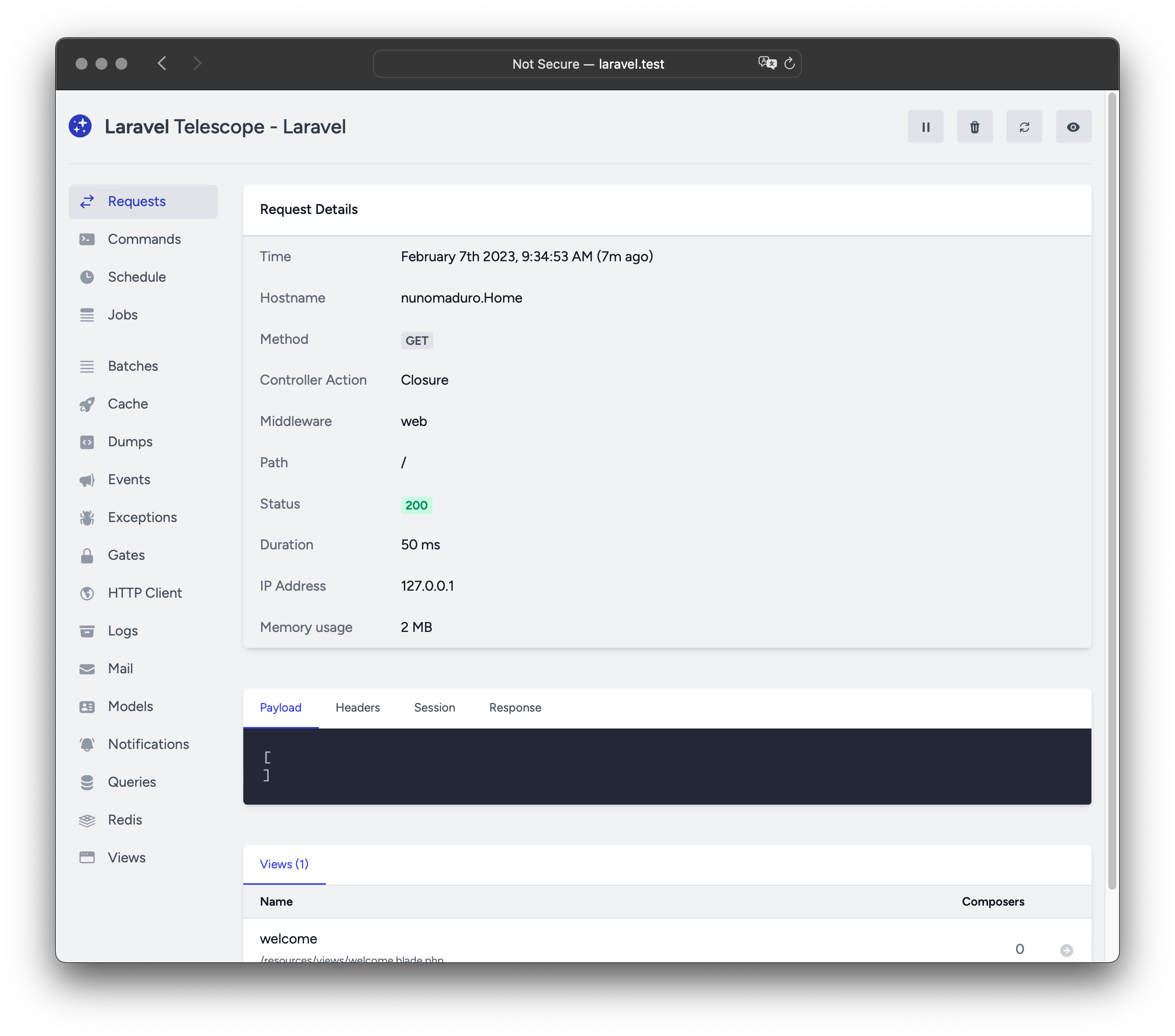
Laravel Telescope는 로컬 Laravel 개발 환경에서 매우 유용한 도구입니다. Telescope는 애플리케이션으로 들어오는 요청, 예외, 로그 엔트리, 데이터베이스 쿼리, 큐에 등록된 작업, 메일, 알림, 캐시 동작, 예약된 작업, 변수 덤프 등 다양한 정보를 한눈에 파악할 수 있게 해줍니다.
설치 (Installation)
Composer 패키지 관리자를 사용하여 Laravel 프로젝트에 Telescope를 설치할 수 있습니다:
composer require laravel/telescope
Telescope 설치 후, telescope:install Artisan 명령어로 에셋과 마이그레이션 파일을 퍼블리시해야 합니다. Telescope 설치가 끝나면, Telescope의 데이터를 저장하는 데 필요한 테이블을 생성하기 위해 migrate 명령어도 실행해야 합니다:
php artisan telescope:install

php artisan migrate
설치가 완료되면 /telescope 경로를 통해 Telescope 대시보드에 접근할 수 있습니다.
로컬 전용 설치
Telescope를 로컬 개발 환경에서만 사용하려는 경우, --dev 플래그를 사용하여 설치할 수 있습니다:
composer require laravel/telescope --dev

php artisan telescope:install

php artisan migrate
telescope:install 실행 후에는, 애플리케이션의 bootstrap/providers.php 설정 파일에서 TelescopeServiceProvider의 자동 등록을 제거해야 합니다. 대신, App\Providers\AppServiceProvider 클래스의 register 메서드에서 Telescope 서비스 프로바이더를 수동으로 등록합니다. 아래와 같이 현재 환경이 local일 때만 프로바이더가 등록되도록 작성합니다:
/**
 * Register any application services.
 */
public function register(): void
{
    if ($this->app->environment('local') && class_exists(\Laravel\Telescope\TelescopeServiceProvider::class)) {
        $this->app->register(\Laravel\Telescope\TelescopeServiceProvider::class);
        $this->app->register(TelescopeServiceProvider::class);
    }
}
마지막으로, Telescope 패키지가 자동 발견되지 않도록 아래 설정을 composer.json 파일의 extra 섹션에 추가해야 합니다:
"extra": {
    "laravel": {
        "dont-discover": [
            "laravel/telescope"
        ]
    }
},
설정
Telescope의 에셋을 퍼블리시하면, 주요 설정 파일이 config/telescope.php 경로에 생성됩니다. 이 파일에서 워처 옵션 등을 세부적으로 설정할 수 있습니다. 각 옵션에는 상세 설명이 주석으로 달려 있으니, 꼼꼼히 확인하는 것이 좋습니다.
필요하다면, 가장 상단의 enabled 옵션을 사용하여 Telescope의 데이터 수집 기능을 완전히 비활성화할 수 있습니다:
'enabled' => env('TELESCOPE_ENABLED', true),
데이터 정리
데이터 정리를 하지 않으면 telescope_entries 테이블에 레코드가 빠르게 쌓일 수 있습니다. 이를 방지하기 위해서는 스케줄러를 이용하여 telescope:prune Artisan 명령어를 매일 실행되도록 해야 합니다:
use Illuminate\Support\Facades\Schedule;

Schedule::command('telescope:prune')->daily();
기본적으로 24시간이 지난 엔트리는 자동으로 삭제됩니다. 엔트리의 보관 기간을 조정하고 싶다면, 명령어 호출 시 hours 옵션을 사용할 수 있습니다. 아래 예시는 48시간이 넘은 레코드를 모두 삭제합니다:
use Illuminate\Support\Facades\Schedule;

Schedule::command('telescope:prune --hours=48')->daily();
대시보드 인가
Telescope 대시보드는 /telescope 경로에서 접근할 수 있습니다. 기본적으로 local 환경에서만 접근이 허용되어 있습니다. app/Providers/TelescopeServiceProvider.php 파일 내에서는 인가 게이트를 정의해두었습니다. 이 게이트를 이용하면 로컬 환경이 아닌 곳에서의 Telescope 접근 권한을 제어할 수 있습니다. 이 부분의 코드는 필요에 따라 수정해 특정 사용자만 접근 가능하게 제한할 수 있습니다:
use App\Models\User;
/**
* Register the Telescope gate.
*
* This gate determines who can access Telescope in non-local environments.
*/
protected function gate(): void
{
Gate::define('viewTelescope', function (User $user) {
return in_array($user->email, [
]);
});
}
운영 환경에서는 반드시
APP_ENV환경 변수를production으로 변경해야 합니다. 그렇지 않으면 Telescope 설치가 외부에 공개될 위험이 있습니다.
Telescope 업그레이드 (Upgrading Telescope)
Telescope의 새로운 주요 버전으로 업그레이드할 때는 반드시 업그레이드 가이드를 꼼꼼히 확인해야 합니다.
또한, 새로운 Telescope 버전으로 업그레이드할 때마다 다음과 같이 Telescope의 에셋을 다시 퍼블리시해야 합니다:
php artisan telescope:publish
에셋을 항상 최신 상태로 유지하고 향후 업데이트에서의 문제를 예방하려면, 애플리케이션의 composer.json 파일 내 post-update-cmd 스크립트에 아래와 같이 vendor:publish --tag=laravel-assets 명령어를 추가하는 것이 좋습니다:
{
    "scripts": {
        "post-update-cmd": [
            "@php artisan vendor:publish --tag=laravel-assets --ansi --force"
        ]
    }
}
필터링 (Filtering)
엔트리
Telescope가 기록하는 데이터를 App\Providers\TelescopeServiceProvider 클래스의 filter 클로저를 통해 필터링할 수 있습니다. 기본값으로, 이 클로저는 local 환경에서는 모든 데이터를 기록하며, 그 외 환경에서는 예외, 실패한 작업, 예약된 작업, 모니터 태그가 걸린 데이터만 기록합니다:
use Laravel\Telescope\IncomingEntry;
use Laravel\Telescope\Telescope;

/**
 * Register any application services.
 */
public function register(): void
{
    $this->hideSensitiveRequestDetails();

    Telescope::filter(function (IncomingEntry $entry) {
        if ($this->app->environment('local')) {
            return true;
        }

        return $entry->isReportableException() ||
            $entry->isFailedJob() ||
            $entry->isScheduledTask() ||
            $entry->isSlowQuery() ||
            $entry->hasMonitoredTag();
    });
}
배치
filter 클로저가 개별 엔트리에 대한 데이터 필터링이라면, filterBatch 메서드는 하나의 요청 혹은 콘솔 명령 전체의 데이터를 필터링하기 위한 클로저를 등록할 수 있습니다. 이 클로저가 true를 반환하면 해당 엔트리 전체가 Telescope에 기록됩니다:
use Illuminate\Support\Collection;
use Laravel\Telescope\IncomingEntry;
use Laravel\Telescope\Telescope;

/**
 * Register any application services.
 */
public function register(): void
{
    $this->hideSensitiveRequestDetails();

    Telescope::filterBatch(function (Collection $entries) {
        if ($this->app->environment('local')) {
            return true;
        }

        return $entries->contains(function (IncomingEntry $entry) {
            return $entry->isReportableException() ||
                $entry->isFailedJob() ||
                $entry->isScheduledTask() ||
                $entry->isSlowQuery() ||
                $entry->hasMonitoredTag();
            });
    });
}
태깅 (Tagging)
Telescope는 "태그"를 활용해 엔트리를 검색할 수 있습니다. 보통 태그는 Eloquent 모델 클래스명이나 인증된 사용자 ID 등이며, 이는 Telescope가 자동으로 부여합니다. 상황에 따라 직접 커스텀 태그를 추가하고 싶은 경우, Telescope::tag 메서드를 사용할 수 있습니다. 이 메서드는 태그 배열을 반환하는 클로저를 인수로 받으며, 반환된 태그는 Telescope가 기본적으로 부여하는 태그와 합쳐집니다. 일반적으로 App\Providers\TelescopeServiceProvider 클래스의 register 메서드 내에서 호출합니다:
use Laravel\Telescope\EntryType;
use Laravel\Telescope\IncomingEntry;
use Laravel\Telescope\Telescope;

/**
 * Register any application services.
 */
public function register(): void
{
    $this->hideSensitiveRequestDetails();

    Telescope::tag(function (IncomingEntry $entry) {
        return $entry->type === EntryType::REQUEST
            ? ['status:'.$entry->content['response_status']]
            : [];
    });
}
사용 가능한 워처 (Available Watchers)
Telescope의 "워처"는 요청 또는 콘솔 명령이 실행될 때 애플리케이션의 다양한 정보를 수집합니다. 활성화할 워처 목록은 config/telescope.php 설정 파일에서 자유롭게 지정할 수 있습니다:
'watchers' => [
    Watchers\CacheWatcher::class => true,
    Watchers\CommandWatcher::class => true,
    // ...
],
일부 워처는 세부 옵션 설정도 가능합니다:
'watchers' => [
    Watchers\QueryWatcher::class => [
        'enabled' => env('TELESCOPE_QUERY_WATCHER', true),
        'slow' => 100,
    ],
    // ...
],
배치 워처
배치 워처는 큐에 등록된 배치 작업의 정보(작업 단위와 연결 정보 등)를 기록합니다.
캐시 워처
캐시 워처는 캐시 키를 적중, 미스, 갱신, 삭제하는 등의 캐시 관련 동작을 기록합니다.
명령어 워처
명령어 워처는 Artisan 명령어가 실행될 때마다 인수, 옵션, 종료 코드, 출력 결과를 기록합니다. 특정 명령어를 기록에서 제외하려면 config/telescope.php 파일의 ignore 옵션에 명령어를 추가할 수 있습니다:
'watchers' => [
    Watchers\CommandWatcher::class => [
        'enabled' => env('TELESCOPE_COMMAND_WATCHER', true),
        'ignore' => ['key:generate'],
    ],
    // ...
],
덤프 워처
덤프 워처는 변수 덤프(dump)를 기록하고 Telescope 내에서 표시합니다. Laravel의 글로벌 dump 함수를 사용할 때 덤프 내용이 추적됩니다. 이 워처는 브라우저에서 덤프 탭이 열려 있어야 덤프가 기록되며, 탭이 닫혀 있을 경우 해당 덤프는 워처에 의해 무시됩니다.
이벤트 워처
이벤트 워처는 애플리케이션에서 발생한 이벤트의 페이로드, 리스너, 브로드캐스트 데이터를 기록합니다. Laravel 프레임워크에서 내부적으로 발생하는 이벤트는 워처가 기록하지 않습니다.
예외 워처
예외 워처는 애플리케이션에서 throw된 보고 가능한(reportable) 예외의 데이터와 스택 트레이스를 기록합니다.
게이트 워처
게이트 워처는 애플리케이션의 게이트와 정책 검사 결과 및 관련 데이터를 기록합니다. 특정 권한 검사를 기록에서 제외하려면, config/telescope.php의 ignore_abilities 옵션에 추가할 수 있습니다:
'watchers' => [
    Watchers\GateWatcher::class => [
        'enabled' => env('TELESCOPE_GATE_WATCHER', true),
        'ignore_abilities' => ['viewNova'],
    ],
    // ...
],
HTTP 클라이언트 워처
HTTP 클라이언트 워처는 애플리케이션에서 발생한 외부 HTTP 클라이언트 요청을 기록합니다.
작업 워처
작업 워처는 애플리케이션에서 디스패치된 작업(잡)의 데이터와 상태를 기록합니다.
로그 워처
로그 워처는 애플리케이션이 기록한 로그 데이터를 기록합니다.
기본적으로 Telescope는 error 레벨 이상의 로그만 기록합니다. 이 동작을 변경하려면, config/telescope.php에서 level 옵션 값을 수정할 수 있습니다:
'watchers' => [
    Watchers\LogWatcher::class => [
        'enabled' => env('TELESCOPE_LOG_WATCHER', true),
        'level' => 'debug',
    ],

    // ...
],
메일 워처
메일 워처를 사용하면 애플리케이션에서 보낸 이메일을 브라우저에서 직접 미리 볼 수 있으며, 관련 데이터도 함께 확인할 수 있습니다. 또한 이메일을 .eml 파일로 다운로드할 수도 있습니다.
모델 워처
모델 워처는 Eloquent 모델 이벤트가 디스패치될 때마다 해당 모델 변경 사항을 기록합니다. 워처의 events 옵션을 사용하여 어떤 이벤트를 기록할지 지정할 수 있습니다:
'watchers' => [
    Watchers\ModelWatcher::class => [
        'enabled' => env('TELESCOPE_MODEL_WATCHER', true),
        'events' => ['eloquent.created*', 'eloquent.updated*'],
    ],
    // ...
],
특정 요청 중 하이드레이션된 모델의 수를 기록하고 싶을 때는, hydrations 옵션을 활성화합니다:
'watchers' => [
    Watchers\ModelWatcher::class => [
        'enabled' => env('TELESCOPE_MODEL_WATCHER', true),
        'events' => ['eloquent.created*', 'eloquent.updated*'],
        'hydrations' => true,
    ],
    // ...
],
알림 워처
알림 워처는 애플리케이션에서 전송된 모든 알림을 기록합니다. 만약 알림이 이메일을 트리거하고 메일 워처가 활성화되어 있다면, 해당 이메일도 메일 워처 화면에서 미리보기가 제공됩니다.
쿼리 워처
쿼리 워처는 애플리케이션에서 실행된 모든 쿼리의 원본 SQL, 바인딩, 실행 시간을 기록합니다. 100ms보다 느린 쿼리는 자동으로 slow 태그가 부여됩니다. 워처의 slow 옵션을 사용하면 느린 쿼리의 임계값을 원하는 대로 조정할 수 있습니다:
'watchers' => [
    Watchers\QueryWatcher::class => [
        'enabled' => env('TELESCOPE_QUERY_WATCHER', true),
        'slow' => 50,
    ],
    // ...
],
Redis 워처
Redis 워처는 애플리케이션에서 실행된 모든 Redis 명령어를 기록합니다. 캐싱에 Redis를 사용하는 경우, 캐시 관련 명령어도 Redis 워처에 기록됩니다.
요청 워처
요청 워처는 애플리케이션에서 처리한 각 요청의 요청 본문, 헤더, 세션, 그리고 응답 데이터를 기록합니다. 기록하는 응답 데이터의 크기를 제어하려면, size_limit(킬로바이트 단위) 옵션을 사용할 수 있습니다:
'watchers' => [
    Watchers\RequestWatcher::class => [
        'enabled' => env('TELESCOPE_REQUEST_WATCHER', true),
        'size_limit' => env('TELESCOPE_RESPONSE_SIZE_LIMIT', 64),
    ],
    // ...
],
스케줄 워처
스케줄 워처는 애플리케이션에서 실행된 예약 작업의 명령어와 출력 결과를 기록합니다.
뷰 워처
뷰 워처는 렌더링된 뷰의 이름, 경로, 데이터, 사용된 "composer" 정보를 기록합니다.
사용자 아바타 표시 (Displaying User Avatars)
Telescope 대시보드는 저장된 각 엔트리별로, 해당 시점에 인증된 사용자의 아바타 이미지를 보여줍니다. 기본적으로 Telescope는 Gravatar 웹 서비스를 통해 아바타를 가져옵니다. 그러나 아바타 URL을 사용자 지정하려면, App\Providers\TelescopeServiceProvider 클래스에서 콜백을 등록할 수 있습니다. 이 콜백은 사용자 ID와 이메일을 받아, 해당 사용자의 아바타 이미지 URL을 반환해야 합니다:
use App\Models\User;
use Laravel\Telescope\Telescope;

/**
 * Register any application services.
 */
public function register(): void
{
    // ...

    Telescope::avatar(function (?string $id, ?string $email) {
        return ! is_null($id)
            ? '/avatars/'.User::find($id)->avatar_path
            : '/generic-avatar.jpg';
    });
}