프롬프트 (Prompts)
소개 (Introduction)
Laravel Prompts는 placeholder 텍스트와 유효성 검증을 포함한 브라우저와 비슷한 기능으로, 명령줄 애플리케이션에 아름답고 사용하기 쉬운 폼을 추가할 수 있게 해주는 PHP 패키지입니다.
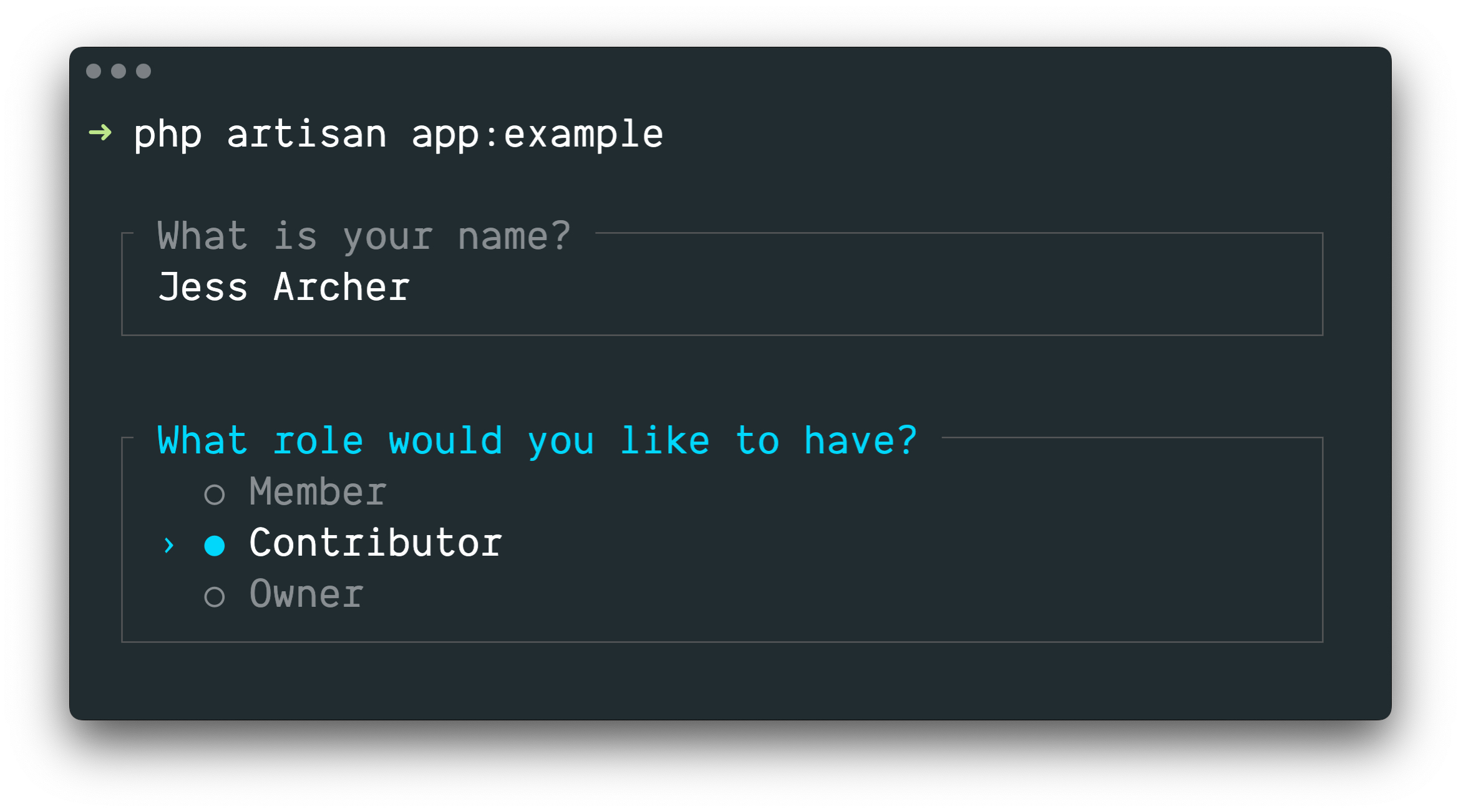
Laravel Prompts는 Artisan 콘솔 명령어에서 사용자 입력을 받기에 적합하지만, 모든 명령줄 PHP 프로젝트에서도 사용할 수 있습니다.
Laravel Prompts는 macOS, Linux, WSL이 설치된 Windows를 지원합니다. 자세한 내용은 지원되지 않는 환경과 폴백 문서를 참고하십시오.
설치 (Installation)
Laravel Prompts는 최신 Laravel 릴리스에 이미 포함되어 있습니다.
Composer 패키지 매니저를 사용하여 다른 PHP 프로젝트에도 Laravel Prompts를 설치할 수 있습니다.
composer require laravel/prompts
사용 가능한 프롬프트 (Available Prompts)
텍스트
text 함수는 사용자에게 주어진 질문을 표시하고 입력을 받은 뒤, 입력값을 반환합니다.
use function Laravel\Prompts\text;

$name = text('What is your name?');
placeholder 텍스트, 기본값, 정보성 힌트도 함께 포함할 수 있습니다.
$name = text(
    label: 'What is your name?',
    placeholder: 'E.g. Taylor Otwell',
    default: $user?->name,
    hint: 'This will be displayed on your profile.'
);
필수 값
반드시 값을 입력해야 한다면 required 인수를 전달할 수 있습니다.
$name = text(
    label: 'What is your name?',
    required: true
);
유효성 검증 메시지를 직접 지정하고 싶다면 문자열도 전달할 수 있습니다.
$name = text(
    label: 'What is your name?',
    required: 'Your name is required.'
);
추가 유효성 검증
마지막으로, 추가 유효성 검증 로직을 수행하고 싶다면 validate 인수에 클로저를 전달할 수 있습니다.
$name = text(
    label: 'What is your name?',
    validate: fn (string $value) => match (true) {
        strlen($value) < 3 => 'The name must be at least 3 characters.',
        strlen($value) > 255 => 'The name must not exceed 255 characters.',
        default => null
    }
);
클로저는 입력된 값을 전달받으며, 오류 메시지를 반환하거나 유효성 검증을 통과한 경우 null을 반환할 수 있습니다.
또는 Laravel의 validator를 활용할 수도 있습니다. 그러려면 속성 이름과 원하는 유효성 검증 규칙을 담은 배열을 validate 인수에 전달하십시오.
$name = text(
    label: 'What is your name?',
    validate: ['name' => 'required|max:255|unique:users']
);
텍스트 영역
textarea 함수는 사용자에게 주어진 질문을 표시하고, 여러 줄을 입력할 수 있는 textarea를 통해 입력을 받은 뒤, 입력값을 반환합니다.
use function Laravel\Prompts\textarea;

$story = textarea('Tell me a story.');
placeholder 텍스트, 기본값, 정보성 힌트도 함께 포함할 수 있습니다.
$story = textarea(
    label: 'Tell me a story.',
    placeholder: 'This is a story about...',
    hint: 'This will be displayed on your profile.'
);
필수 값
반드시 값을 입력해야 한다면 required 인수를 전달할 수 있습니다.
$story = textarea(
    label: 'Tell me a story.',
    required: true
);
유효성 검증 메시지를 직접 지정하고 싶다면 문자열도 전달할 수 있습니다.
$story = textarea(
    label: 'Tell me a story.',
    required: 'A story is required.'
);
추가 유효성 검증
마지막으로, 추가 유효성 검증 로직을 수행하고 싶다면 validate 인수에 클로저를 전달할 수 있습니다.
$story = textarea(
    label: 'Tell me a story.',
    validate: fn (string $value) => match (true) {
        strlen($value) < 250 => 'The story must be at least 250 characters.',
        strlen($value) > 10000 => 'The story must not exceed 10,000 characters.',
        default => null
    }
);
클로저는 입력된 값을 전달받으며, 오류 메시지를 반환하거나 유효성 검증을 통과한 경우 null을 반환할 수 있습니다.
또는 Laravel의 validator를 활용할 수도 있습니다. 그러려면 속성 이름과 원하는 유효성 검증 규칙을 담은 배열을 validate 인수에 전달하십시오.
$story = textarea(
    label: 'Tell me a story.',
    validate: ['story' => 'required|max:10000']
);
숫자
number 함수는 사용자에게 주어진 질문을 표시하고 숫자 입력을 받은 뒤, 입력값을 반환합니다. number 함수에서는 사용자가 위쪽 및 아래쪽 화살표 키를 사용하여 숫자를 조정할 수 있습니다.
use function Laravel\Prompts\number;

$number = number('How many copies would you like?');
placeholder 텍스트, 기본값, 정보성 힌트도 함께 포함할 수 있습니다.
$name = number(
    label: 'How many copies would you like?',
    placeholder: '5',
    default: 1,
    hint: 'This will be determine how many copies to create.'
);
필수 값
반드시 값을 입력해야 한다면 required 인수를 전달할 수 있습니다.
$copies = number(
    label: 'How many copies would you like?',
    required: true
);
유효성 검증 메시지를 직접 지정하고 싶다면 문자열도 전달할 수 있습니다.
$copies = number(
    label: 'How many copies would you like?',
    required: 'A number of copies is required.'
);
추가 유효성 검증
마지막으로, 추가 유효성 검증 로직을 수행하고 싶다면 validate 인수에 클로저를 전달할 수 있습니다.
$copies = number(
    label: 'How many copies would you like?',
    validate: fn (?int $value) => match (true) {
        $value < 1 => 'At least one copy is required.',
        $value > 100 => 'You may not create more than 100 copies.',
        default => null
    }
);
클로저는 입력된 값을 전달받으며, 오류 메시지를 반환하거나 유효성 검증을 통과한 경우 null을 반환할 수 있습니다.
또는 Laravel의 validator를 활용할 수도 있습니다. 그러려면 속성 이름과 원하는 유효성 검증 규칙을 담은 배열을 validate 인수에 전달하십시오.
$copies = number(
    label: 'How many copies would you like?',
    validate: ['copies' => 'required|integer|min:1|max:100']
);
비밀번호
password 함수는 text 함수와 비슷하지만, 사용자가 콘솔에 입력하는 내용이 마스킹됩니다. 비밀번호 같은 민감한 정보를 요청할 때 유용합니다.
use function Laravel\Prompts\password;

$password = password('What is your password?');
placeholder 텍스트와 정보성 힌트도 함께 포함할 수 있습니다.
$password = password(
    label: 'What is your password?',
    placeholder: 'password',
    hint: 'Minimum 8 characters.'
);
필수 값
반드시 값을 입력해야 한다면 required 인수를 전달할 수 있습니다.
$password = password(
    label: 'What is your password?',
    required: true
);
유효성 검증 메시지를 직접 지정하고 싶다면 문자열도 전달할 수 있습니다.
$password = password(
    label: 'What is your password?',
    required: 'The password is required.'
);
추가 유효성 검증
마지막으로, 추가 유효성 검증 로직을 수행하고 싶다면 validate 인수에 클로저를 전달할 수 있습니다.
$password = password(
    label: 'What is your password?',
    validate: fn (string $value) => match (true) {
        strlen($value) < 8 => 'The password must be at least 8 characters.',
        default => null
    }
);
클로저는 입력된 값을 전달받으며, 오류 메시지를 반환하거나 유효성 검증을 통과한 경우 null을 반환할 수 있습니다.
또는 Laravel의 validator를 활용할 수도 있습니다. 그러려면 속성 이름과 원하는 유효성 검증 규칙을 담은 배열을 validate 인수에 전달하십시오.
$password = password(
    label: 'What is your password?',
    validate: ['password' => 'min:8']
);
확인
사용자에게 "yes or no" 확인을 요청해야 한다면 confirm 함수를 사용할 수 있습니다. 사용자는 화살표 키를 사용하거나 y 또는 n을 눌러 응답을 선택할 수 있습니다. 이 함수는 true 또는 false를 반환합니다.
use function Laravel\Prompts\confirm;

$confirmed = confirm('Do you accept the terms?');
기본값, "Yes"와 "No" 레이블의 사용자 지정 문구, 정보성 힌트도 함께 포함할 수 있습니다.
$confirmed = confirm(
    label: 'Do you accept the terms?',
    default: false,
    yes: 'I accept',
    no: 'I decline',
    hint: 'The terms must be accepted to continue.'
);
"Yes" 필수 선택
필요하다면 required 인수를 전달하여 사용자가 반드시 "Yes"를 선택하도록 요구할 수 있습니다.
$confirmed = confirm(
    label: 'Do you accept the terms?',
    required: true
);
유효성 검증 메시지를 직접 지정하고 싶다면 문자열도 전달할 수 있습니다.
$confirmed = confirm(
    label: 'Do you accept the terms?',
    required: 'You must accept the terms to continue.'
);
선택
사용자가 미리 정의된 선택지 중 하나를 선택해야 한다면 select 함수를 사용할 수 있습니다.
use function Laravel\Prompts\select;

$role = select(
    label: 'What role should the user have?',
    options: ['Member', 'Contributor', 'Owner']
);
기본 선택지와 정보성 힌트도 지정할 수 있습니다.
$role = select(
    label: 'What role should the user have?',
    options: ['Member', 'Contributor', 'Owner'],
    default: 'Owner',
    hint: 'The role may be changed at any time.'
);
선택된 값 대신 선택된 키를 반환하도록 options 인수에 연관 배열을 전달할 수도 있습니다.
$role = select(
    label: 'What role should the user have?',
    options: [
        'member' => 'Member',
        'contributor' => 'Contributor',
        'owner' => 'Owner',
    ],
    default: 'owner'
);
목록이 스크롤되기 전까지 최대 5개의 옵션이 표시됩니다. scroll 인수를 전달하여 이 값을 조정할 수 있습니다.
$role = select(
    label: 'Which category would you like to assign?',
    options: Category::pluck('name', 'id'),
    scroll: 10
);
추가 유효성 검증
다른 프롬프트 함수와 달리 select 함수는 required 인수를 받지 않습니다. 아무것도 선택하지 않는 것이 불가능하기 때문입니다. 그러나 옵션을 표시하되 선택은 막아야 하는 경우에는 validate 인수에 클로저를 전달할 수 있습니다.
$role = select(
    label: 'What role should the user have?',
    options: [
        'member' => 'Member',
        'contributor' => 'Contributor',
        'owner' => 'Owner',
    ],
    validate: fn (string $value) =>
        $value === 'owner' && User::where('role', 'owner')->exists()
            ? 'An owner already exists.'
            : null
);
options 인수가 연관 배열이면 클로저는 선택된 키를 받습니다. 그렇지 않으면 선택된 값을 받습니다. 클로저는 오류 메시지를 반환하거나, 유효성 검증을 통과한 경우 null을 반환할 수 있습니다.
다중 선택
사용자가 여러 옵션을 선택할 수 있어야 하는 경우 multiselect 함수를 사용할 수 있습니다.
use function Laravel\Prompts\multiselect;

$permissions = multiselect(
    label: 'What permissions should be assigned?',
    options: ['Read', 'Create', 'Update', 'Delete']
);
기본 선택값과 안내 힌트도 지정할 수 있습니다.
use function Laravel\Prompts\multiselect;

$permissions = multiselect(
    label: 'What permissions should be assigned?',
    options: ['Read', 'Create', 'Update', 'Delete'],
    default: ['Read', 'Create'],
    hint: 'Permissions may be updated at any time.'
);
options 인수에 연관 배열을 전달하여 선택된 옵션의 값 대신 키를 반환하도록 할 수도 있습니다.
$permissions = multiselect(
    label: 'What permissions should be assigned?',
    options: [
        'read' => 'Read',
        'create' => 'Create',
        'update' => 'Update',
        'delete' => 'Delete',
    ],
    default: ['read', 'create']
);
목록이 스크롤되기 전까지 최대 5개의 옵션이 표시됩니다. scroll 인수를 전달하여 이 값을 조정할 수 있습니다.
$categories = multiselect(
    label: 'What categories should be assigned?',
    options: Category::pluck('name', 'id'),
    scroll: 10
);
값 필수 지정
기본적으로 사용자는 옵션을 0개 이상 선택할 수 있습니다. 대신 하나 이상의 옵션을 반드시 선택하게 하려면 required 인수를 전달할 수 있습니다.
$categories = multiselect(
    label: 'What categories should be assigned?',
    options: Category::pluck('name', 'id'),
    required: true
);
유효성 검증 메시지를 직접 지정하고 싶다면 required 인수에 문자열을 제공할 수 있습니다.
$categories = multiselect(
    label: 'What categories should be assigned?',
    options: Category::pluck('name', 'id'),
    required: 'You must select at least one category'
);
추가 유효성 검증
옵션을 표시하되 선택은 막아야 하는 경우 validate 인수에 클로저를 전달할 수 있습니다.
$permissions = multiselect(
    label: 'What permissions should the user have?',
    options: [
        'read' => 'Read',
        'create' => 'Create',
        'update' => 'Update',
        'delete' => 'Delete',
    ],
    validate: fn (array $values) => ! in_array('read', $values)
        ? 'All users require the read permission.'
        : null
);
options 인수가 연관 배열이면 클로저는 선택된 키를 받습니다. 그렇지 않으면 선택된 값을 받습니다. 클로저는 오류 메시지를 반환하거나, 유효성 검증을 통과한 경우 null을 반환할 수 있습니다.
제안
suggest 함수는 가능한 선택지에 대해 자동 완성을 제공하는 데 사용할 수 있습니다. 사용자는 자동 완성 힌트와 관계없이 어떤 답변이든 입력할 수 있습니다.
use function Laravel\Prompts\suggest;

$name = suggest('What is your name?', ['Taylor', 'Dayle']);
또는 suggest 함수의 두 번째 인수로 클로저를 전달할 수 있습니다. 이 클로저는 사용자가 입력 문자를 하나 입력할 때마다 호출됩니다. 클로저는 지금까지 사용자가 입력한 내용을 담은 문자열 매개변수를 받아야 하며, 자동 완성에 사용할 옵션 배열을 반환해야 합니다.
$name = suggest(
    label: 'What is your name?',
    options: fn ($value) => collect(['Taylor', 'Dayle'])
        ->filter(fn ($name) => Str::contains($name, $value, ignoreCase: true))
)
플레이스홀더 텍스트, 기본값, 안내 힌트도 포함할 수 있습니다.
$name = suggest(
    label: 'What is your name?',
    options: ['Taylor', 'Dayle'],
    placeholder: 'E.g. Taylor',
    default: $user?->name,
    hint: 'This will be displayed on your profile.'
);
필수 값
값을 반드시 입력해야 한다면 required 인수를 전달할 수 있습니다.
$name = suggest(
    label: 'What is your name?',
    options: ['Taylor', 'Dayle'],
    required: true
);
유효성 검증 메시지를 직접 지정하고 싶다면 문자열을 전달할 수도 있습니다.
$name = suggest(
    label: 'What is your name?',
    options: ['Taylor', 'Dayle'],
    required: 'Your name is required.'
);
추가 유효성 검증
마지막으로, 추가 유효성 검증 로직을 수행하고 싶다면 validate 인수에 클로저를 전달할 수 있습니다.
$name = suggest(
    label: 'What is your name?',
    options: ['Taylor', 'Dayle'],
    validate: fn (string $value) => match (true) {
        strlen($value) < 3 => 'The name must be at least 3 characters.',
        strlen($value) > 255 => 'The name must not exceed 255 characters.',
        default => null
    }
);
클로저는 입력된 값을 받으며, 오류 메시지를 반환하거나 유효성 검증을 통과한 경우 null을 반환할 수 있습니다.
또는 Laravel의 validator를 활용할 수도 있습니다. 그렇게 하려면 속성 이름과 원하는 유효성 검증 규칙을 담은 배열을 validate 인수에 제공하면 됩니다.
$name = suggest(
    label: 'What is your name?',
    options: ['Taylor', 'Dayle'],
    validate: ['name' => 'required|min:3|max:255']
);
검색
사용자가 선택할 옵션이 많다면 search 함수를 사용하여 사용자가 검색어를 입력해 결과를 필터링한 뒤, 방향키로 옵션을 선택하게 할 수 있습니다.
use function Laravel\Prompts\search;

$id = search(
    label: 'Search for the user that should receive the mail',
    options: fn (string $value) => strlen($value) > 0
        ? User::whereLike('name', "%{$value}%")->pluck('name', 'id')->all()
        : []
);
클로저는 지금까지 사용자가 입력한 텍스트를 받으며, 옵션 배열을 반환해야 합니다. 연관 배열을 반환하면 선택된 옵션의 키가 반환되고, 그렇지 않으면 해당 옵션의 값이 반환됩니다.
값을 반환하려는 배열을 필터링할 때는 배열이 연관 배열이 되지 않도록 array_values 함수나 values Collection 메서드를 사용해야 합니다.
$names = collect(['Taylor', 'Abigail']);

$selected = search(
    label: 'Search for the user that should receive the mail',
    options: fn (string $value) => $names
        ->filter(fn ($name) => Str::contains($name, $value, ignoreCase: true))
        ->values()
        ->all(),
);
플레이스홀더 텍스트와 안내 힌트도 포함할 수 있습니다.
$id = search(
    label: 'Search for the user that should receive the mail',
    placeholder: 'E.g. Taylor Otwell',
    options: fn (string $value) => strlen($value) > 0
        ? User::whereLike('name', "%{$value}%")->pluck('name', 'id')->all()
        : [],
    hint: 'The user will receive an email immediately.'
);
목록이 스크롤되기 전까지 최대 5개의 옵션이 표시됩니다. scroll 인수를 전달하여 이 값을 조정할 수 있습니다.
$id = search(
    label: 'Search for the user that should receive the mail',
    options: fn (string $value) => strlen($value) > 0
        ? User::whereLike('name', "%{$value}%")->pluck('name', 'id')->all()
        : [],
    scroll: 10
);
추가 유효성 검증
추가 유효성 검증 로직을 수행하고 싶다면 validate 인수에 클로저를 전달할 수 있습니다.
$id = search(
    label: 'Search for the user that should receive the mail',
    options: fn (string $value) => strlen($value) > 0
        ? User::whereLike('name', "%{$value}%")->pluck('name', 'id')->all()
        : [],
    validate: function (int|string $value) {
        $user = User::findOrFail($value);

        if ($user->opted_out) {
            return 'This user has opted-out of receiving mail.';
        }
    }
);
options 클로저가 연관 배열을 반환하면 클로저는 선택된 키를 받습니다. 그렇지 않으면 선택된 값을 받습니다. 클로저는 오류 메시지를 반환하거나, 유효성 검증을 통과한 경우 null을 반환할 수 있습니다.
다중 검색
검색 가능한 옵션이 많고 사용자가 여러 항목을 선택할 수 있어야 한다면 multisearch 함수를 사용하여 사용자가 검색어를 입력해 결과를 필터링한 뒤, 방향키와 스페이스바로 옵션을 선택하게 할 수 있습니다.
use function Laravel\Prompts\multisearch;

$ids = multisearch(
    'Search for the users that should receive the mail',
    fn (string $value) => strlen($value) > 0
        ? User::whereLike('name', "%{$value}%")->pluck('name', 'id')->all()
        : []
);
클로저는 지금까지 사용자가 입력한 텍스트를 받으며, 옵션 배열을 반환해야 합니다. 연관 배열을 반환하면 선택된 옵션들의 키가 반환되고, 그렇지 않으면 해당 옵션들의 값이 반환됩니다.
값을 반환하려는 배열을 필터링할 때는 배열이 연관 배열이 되지 않도록 array_values 함수나 values Collection 메서드를 사용해야 합니다.
$names = collect(['Taylor', 'Abigail']);

$selected = multisearch(
    label: 'Search for the users that should receive the mail',
    options: fn (string $value) => $names
        ->filter(fn ($name) => Str::contains($name, $value, ignoreCase: true))
        ->values()
        ->all(),
);
플레이스홀더 텍스트와 안내 힌트도 포함할 수 있습니다.
$ids = multisearch(
    label: 'Search for the users that should receive the mail',
    placeholder: 'E.g. Taylor Otwell',
    options: fn (string $value) => strlen($value) > 0
        ? User::whereLike('name', "%{$value}%")->pluck('name', 'id')->all()
        : [],
    hint: 'The user will receive an email immediately.'
);
목록이 스크롤되기 전까지 최대 5개의 옵션이 표시됩니다. scroll 인수를 제공하여 이 값을 조정할 수 있습니다.
$ids = multisearch(
    label: 'Search for the users that should receive the mail',
    options: fn (string $value) => strlen($value) > 0
        ? User::whereLike('name', "%{$value}%")->pluck('name', 'id')->all()
        : [],
    scroll: 10
);
값 필수 지정
기본적으로 사용자는 옵션을 0개 이상 선택할 수 있습니다. 대신 하나 이상의 옵션을 반드시 선택하게 하려면 required 인수를 전달할 수 있습니다.
$ids = multisearch(
    label: 'Search for the users that should receive the mail',
    options: fn (string $value) => strlen($value) > 0
        ? User::whereLike('name', "%{$value}%")->pluck('name', 'id')->all()
        : [],
    required: true
);
유효성 검증 메시지를 직접 지정하고 싶다면 required 인수에 문자열을 제공할 수도 있습니다.
$ids = multisearch(
    label: 'Search for the users that should receive the mail',
    options: fn (string $value) => strlen($value) > 0
        ? User::whereLike('name', "%{$value}%")->pluck('name', 'id')->all()
        : [],
    required: 'You must select at least one user.'
);
추가 유효성 검증
추가 유효성 검증 로직을 수행하고 싶다면 validate 인수에 클로저를 전달할 수 있습니다.
$ids = multisearch(
    label: 'Search for the users that should receive the mail',
    options: fn (string $value) => strlen($value) > 0
        ? User::whereLike('name', "%{$value}%")->pluck('name', 'id')->all()
        : [],
    validate: function (array $values) {
        $optedOut = User::whereLike('name', '%a%')->findMany($values);

        if ($optedOut->isNotEmpty()) {
            return $optedOut->pluck('name')->join(', ', ', and ').' have opted out.';
        }
    }
);
options 클로저가 연관 배열을 반환하면, 해당 클로저는 선택된 키를 받습니다. 그렇지 않으면 선택된 값을 받습니다. 클로저는 오류 메시지를 반환하거나, 유효성 검증을 통과한 경우 null을 반환할 수 있습니다.
일시 중지
pause 함수는 사용자에게 안내 문구를 표시하고, 사용자가 Enter / Return 키를 눌러 계속 진행하겠다는 의사를 확인할 때까지 기다리는 데 사용할 수 있습니다.
use function Laravel\Prompts\pause;

pause('Press ENTER to continue.');
유효성 검증 전에 입력 변환하기 (Transforming Input Before Validation)
때로는 유효성 검증이 실행되기 전에 프롬프트 입력을 변환하고 싶을 수 있습니다. 예를 들어, 제공된 문자열에서 공백을 제거하고 싶을 수 있습니다. 이를 위해 많은 프롬프트 함수는 클로저를 받는 transform 인수를 제공합니다.
$name = text(
    label: 'What is your name?',
    transform: fn (string $value) => trim($value),
    validate: fn (string $value) => match (true) {
        strlen($value) < 3 => 'The name must be at least 3 characters.',
        strlen($value) > 255 => 'The name must not exceed 255 characters.',
        default => null
    }
);
폼 (Forms)
추가 작업을 수행하기 전에 정보를 수집하기 위해 여러 프롬프트를 순서대로 표시해야 하는 경우가 많습니다. form 함수를 사용하면 사용자가 완료할 프롬프트 묶음을 만들 수 있습니다.
use function Laravel\Prompts\form;

$responses = form()
    ->text('What is your name?', required: true)
    ->password('What is your password?', validate: ['password' => 'min:8'])
    ->confirm('Do you accept the terms?')
    ->submit();
submit 메서드는 폼의 프롬프트에서 받은 모든 응답을 숫자 인덱스 배열로 반환합니다. 하지만 name 인수를 통해 각 프롬프트에 이름을 지정할 수 있습니다. 이름이 제공되면, 해당 이름으로 지정된 프롬프트의 응답에 그 이름을 통해 접근할 수 있습니다.
use App\Models\User;
use function Laravel\Prompts\form;

$responses = form()
    ->text('What is your name?', required: true, name: 'name')
    ->password(
        label: 'What is your password?',
        validate: ['password' => 'min:8'],
        name: 'password'
    )
    ->confirm('Do you accept the terms?')
    ->submit();

User::create([
    'name' => $responses['name'],
    'password' => $responses['password'],
]);
form 함수를 사용할 때의 가장 큰 장점은 사용자가 CTRL + U를 사용하여 폼의 이전 프롬프트로 돌아갈 수 있다는 점입니다. 이를 통해 사용자는 전체 폼을 취소하고 다시 시작하지 않아도 실수를 수정하거나 선택을 변경할 수 있습니다.
폼 안의 프롬프트를 더 세밀하게 제어해야 한다면, 프롬프트 함수를 직접 호출하는 대신 add 메서드를 호출할 수 있습니다. add 메서드에는 사용자가 이전에 제공한 모든 응답이 전달됩니다.
use function Laravel\Prompts\form;
use function Laravel\Prompts\outro;
use function Laravel\Prompts\text;

$responses = form()
    ->text('What is your name?', required: true, name: 'name')
    ->add(function ($responses) {
        return text("How old are you, {$responses['name']}?");
    }, name: 'age')
    ->submit();

outro("Your name is {$responses['name']} and you are {$responses['age']} years old.");
정보 메시지 (Informational Messages)
note, info, warning, error, alert 함수는 정보 메시지를 표시하는 데 사용할 수 있습니다.
use function Laravel\Prompts\info;

info('Package installed successfully.');
테이블 (Tables)
table 함수를 사용하면 여러 행과 컬럼으로 구성된 데이터를 쉽게 표시할 수 있습니다. 컬럼 이름과 테이블에 표시할 데이터만 제공하면 됩니다.
use function Laravel\Prompts\table;

table(
    headers: ['Name', 'Email'],
    rows: User::all(['name', 'email'])->toArray()
);
스핀 (Spin)
spin 함수는 지정된 콜백을 실행하는 동안 선택적 메시지와 함께 스피너를 표시합니다. 이 함수는 작업이 진행 중임을 나타내며, 완료되면 콜백의 결과를 반환합니다.
use function Laravel\Prompts\spin;

$response = spin(
    callback: fn () => Http::get('http://example.com'),
    message: 'Fetching response...'
);
spin함수가 스피너를 애니메이션으로 표시하려면 PCNTL PHP 확장이 필요합니다. 이 확장을 사용할 수 없는 경우에는 정적인 버전의 스피너가 대신 표시됩니다.
진행률 표시줄 (Progress Bars)
오래 실행되는 작업에서는 작업이 얼마나 완료되었는지 사용자에게 알려 주는 진행률 표시줄을 보여 주면 유용합니다. progress 함수를 사용하면 Laravel은 진행률 표시줄을 표시하고, 주어진 반복 가능한 값을 순회할 때마다 진행률을 증가시킵니다.
use function Laravel\Prompts\progress;

$users = progress(
    label: 'Updating users',
    steps: User::all(),
    callback: fn ($user) => $this->performTask($user)
);
progress 함수는 map 함수처럼 동작하며, 콜백의 각 반복에서 반환된 값을 담은 배열을 반환합니다.
콜백은 Laravel\Prompts\Progress 인스턴스도 받을 수 있으므로, 각 반복마다 레이블과 힌트를 수정할 수 있습니다.
$users = progress(
    label: 'Updating users',
    steps: User::all(),
    callback: function ($user, $progress) {
        $progress
            ->label("Updating {$user->name}")
            ->hint("Created on {$user->created_at}");

        return $this->performTask($user);
    },
    hint: 'This may take some time.'
);
때로는 진행률 표시줄이 어떻게 증가하는지 더 수동으로 제어해야 할 수 있습니다. 먼저 프로세스가 반복할 전체 단계 수를 정의합니다. 그런 다음 각 항목을 처리한 뒤 advance 메서드를 통해 진행률 표시줄을 증가시킵니다.
$progress = progress(label: 'Updating users', steps: 10);

$users = User::all();

$progress->start();

foreach ($users as $user) {
    $this->performTask($user);

    $progress->advance();
}

$progress->finish();
터미널 지우기 (Clearing the Terminal)
clear 함수는 사용자의 터미널을 지우는 데 사용할 수 있습니다.
use function Laravel\Prompts\clear;

clear();
터미널 고려 사항 (Terminal Considerations)
터미널 너비
레이블, 옵션, 유효성 검증 메시지 중 하나라도 사용자의 터미널 "컬럼" 수를 초과하면, 터미널에 맞도록 자동으로 잘립니다. 사용자가 더 좁은 터미널을 사용할 수 있다면 이러한 문자열의 길이를 줄이는 것을 고려하십시오. 80자 터미널을 지원하려면 일반적으로 안전한 최대 길이는 74자입니다.
터미널 높이
scroll 인수를 받는 모든 프롬프트의 경우, 설정된 값은 유효성 검증 메시지를 위한 공간을 포함하여 사용자의 터미널 높이에 맞도록 자동으로 줄어듭니다.
지원되지 않는 환경과 폴백 (Unsupported Environments and Fallbacks)
Laravel Prompts는 macOS, Linux, 그리고 WSL을 사용하는 Windows를 지원합니다. PHP의 Windows 버전 제한으로 인해, 현재 WSL 외부의 Windows에서는 Laravel Prompts를 사용할 수 없습니다.
이러한 이유로 Laravel Prompts는 Symfony Console Question Helper와 같은 대체 구현으로 폴백하는 기능을 지원합니다.
Laravel 프레임워크에서 Laravel Prompts를 사용할 때는 각 프롬프트에 대한 폴백이 이미 설정되어 있으며, 지원되지 않는 환경에서 자동으로 활성화됩니다.
폴백 조건
Laravel을 사용하지 않거나 폴백 동작이 사용되는 시점을 사용자 지정해야 한다면, Prompt 클래스의 fallbackWhen 정적 메서드에 boolean 값을 전달할 수 있습니다.
use Laravel\Prompts\Prompt;

Prompt::fallbackWhen(
    ! $input->isInteractive() || windows_os() || app()->runningUnitTests()
);
폴백 동작
Laravel을 사용하지 않거나 폴백 동작을 사용자 지정해야 한다면, 각 프롬프트 클래스의 fallbackUsing 정적 메서드에 클로저를 전달할 수 있습니다.
use Laravel\Prompts\TextPrompt;
use Symfony\Component\Console\Question\Question;
use Symfony\Component\Console\Style\SymfonyStyle;

TextPrompt::fallbackUsing(function (TextPrompt $prompt) use ($input, $output) {
    $question = (new Question($prompt->label, $prompt->default ?: null))
        ->setValidator(function ($answer) use ($prompt) {
            if ($prompt->required && $answer === null) {
                throw new \RuntimeException(
                    is_string($prompt->required) ? $prompt->required : 'Required.'
                );
            }

            if ($prompt->validate) {
                $error = ($prompt->validate)($answer ?? '');

                if ($error) {
                    throw new \RuntimeException($error);
                }
            }

            return $answer;
        });

    return (new SymfonyStyle($input, $output))
        ->askQuestion($question);
});
폴백은 각 프롬프트 클래스마다 개별적으로 설정해야 합니다. 클로저는 프롬프트 클래스의 인스턴스를 받으며, 해당 프롬프트에 적절한 타입을 반환해야 합니다.
테스트 (Testing)
Laravel은 명령어가 기대한 Prompt 메시지를 표시하는지 테스트하기 위한 다양한 메서드를 제공합니다.
test('report generation', function () {
$this->artisan('report:generate')
->expectsPromptsInfo('Welcome to the application!')
->expectsPromptsWarning('This action cannot be undone')
->expectsPromptsError('Something went wrong')
->expectsPromptsAlert('Important notice!')
->expectsPromptsIntro('Starting process...')
->expectsPromptsOutro('Process completed!')
->expectsPromptsTable(
headers: ['Name', 'Email'],
rows: [
]
)
->assertExitCode(0);
});
public function test_report_generation(): void
{
$this->artisan('report:generate')
->expectsPromptsInfo('Welcome to the application!')
->expectsPromptsWarning('This action cannot be undone')
->expectsPromptsError('Something went wrong')
->expectsPromptsAlert('Important notice!')
->expectsPromptsIntro('Starting process...')
->expectsPromptsOutro('Process completed!')
->expectsPromptsTable(
headers: ['Name', 'Email'],
rows: [
]
)
->assertExitCode(0);
}